NumPy arange builds a numerical sequence from a start, a stop and a step
A numerical sequence becomes easier to read when its starting value, boundary and spacing are stated separately. NumPy arange returns an array of evenly spaced values within an interval. For straightforward integer examples, the start is included and the stop is excluded. The step tells the reader how the sequence advances.
Academia Master Trader presents this explanation in English for readers in Sierra Leone. The examples describe numerical arrays only. They are not prices, trading signals or financial results. The aim is to understand the arguments before interpreting the output, especially the difference between a stopping boundary and a value that must appear in the result.
Read the three arguments in order
The expression np.arange(2,10,2) produces [2,4,6,8]. The start is two, the stop is ten and the step is two. Beginning at two, the sequence advances by two while remaining below the stopping boundary.
Ten is not included in this integer example. It names the boundary at which the sequence stops, not a final item promised to the reader. The last value is eight because the next step would reach ten.
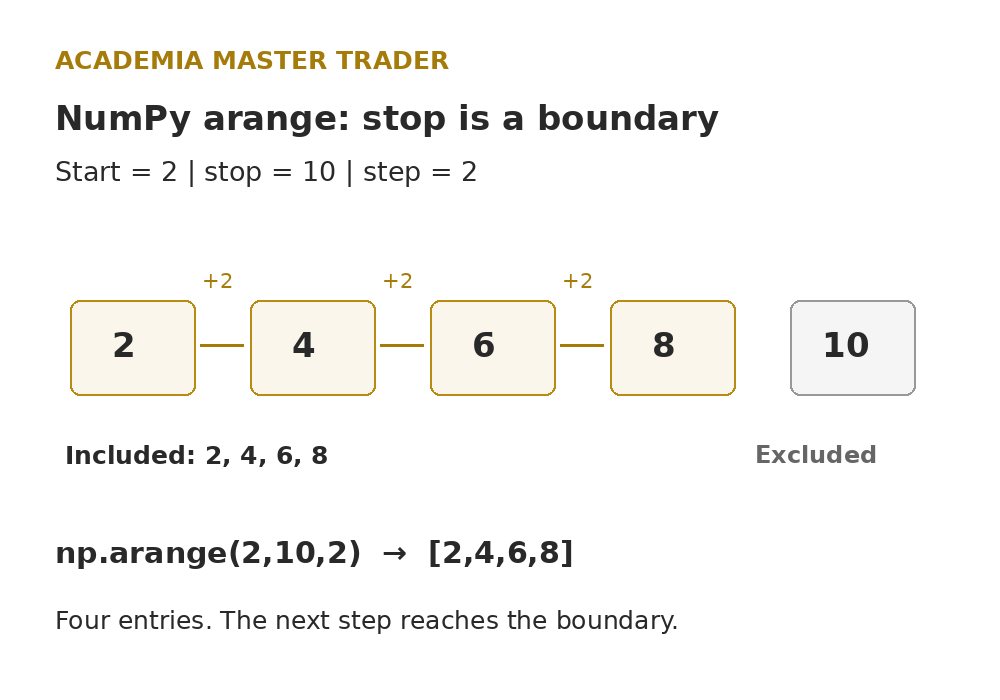
There are four output entries, even though none of the arguments directly states four. The entry count follows from the start, stop and step together. Reading only the stopping number would not tell you how many values the array contains.
One argument supplies only the stop
The expression np.arange(4) produces [0,1,2,3]. With this calling form, four is the stop. The default start is zero and the default step is one. It does not create a one-entry array containing four.
The expression np.arange(3,7) produces [3,4,5,6]. Supplying two positional arguments makes the first the start and the second the stop. The omitted step still defaults to one.
Writing the roles beside an example is more useful than relying on the numbers alone. A value in the first position has a different role when only one argument is supplied than it has in the three-argument form. The calling form must be read as a whole.
The step controls direction as well as spacing
An integer sequence can descend when its step is negative. For example, np.arange(8,0,-2) produces [8,6,4,2]. The start is included, and the stop at zero is excluded. Each successive value is two smaller than the preceding value.
A positive step and a negative step describe different directions. The boundary must be consistent with that direction for the intended non-empty sequence. Thinking about the first few values makes the requested direction clear before any long output is considered.
The step is not a request for that many entries. In the opening example, a step of two creates spacing of two between neighbouring values. The resulting count depends on the interval as well as the spacing.
The returned object is an array
For integer arguments, the NumPy reference describes arange as roughly equivalent to Python's built-in range in the sequence it specifies. The important distinction is that arange returns a NumPy array rather than a range object.
That distinction matters when explaining what a variable now contains. The small sequence [2,4,6,8] is a one-dimensional numerical array with four entries. It is not automatically a row matrix with shape (1,4) or a column matrix with shape (4,1).
Describe the values and the arrangement separately. Equal spacing tells you about neighbouring numbers. It does not add another axis to the output. A later operation may reshape the data, but that is a separate step in the program.
Data type comes from the arguments unless specified
When dtype is omitted, the reference states that the output data type is inferred from the other arguments. An integer-based example and a floating-point example can therefore produce different numerical representations.
An explicit dtype is a request about representation, not merely a display preference. Choosing an integer representation while supplying a fractional step can change how the sequence is populated. The reference gives examples where that combination does not produce the fractional progression a reader might expect.
Keep a beginner explanation simple by using small integer arguments first. Once the start, stop and step are clear, discuss representation separately. This avoids mixing a question about interval boundaries with a question about numerical conversion.
Fractional spacing needs an additional check
Floating-point arithmetic can affect the length and endpoint behaviour of arange. The reference therefore recommends considering linspace for non-integer steps, especially when careful endpoint handling is important. The integer boundary rule should not be stretched into a guarantee about every floating-point call.
This does not change the meaning of the opening integer example. It sets the scope of that example clearly. A reliable explanation states which arguments it uses and checks the actual output before making claims about a final value or the number of entries.
Explain the interval before the result
Continue learning with Academia Master Trader at academiamastertrader.com.br. Aprenda provides access to educational material. Name the start, stop and step, identify the direction and then read the generated values. A clear interval description prevents a stopping boundary from being mistaken for a required final entry.