NumPy array split divides uneven lengths into sections that differ by at most one entry
An array does not always divide evenly into the requested number of sections. NumPy provides array split for that situation. With an integer section count, it distributes entries into equal or near equal sections while preserving their sequence along the chosen axis. Academia Master Trader explains this behavior in English for readers in Belarus. Constructed examples show where the longer sections appear and why a requested section count differs from a desired section length.
Eight entries divided into three sections
After import numpy as np, define x = np.array([2,4,6,8,10,12,14,16]). The call parts = np.array_split(x,3) returns [2,4,6], [8,10,12] and [14,16]. These sections have lengths three, three and two. Every input entry appears once in this division, and the original order remains unchanged.
The number three means the number of sections. It is not the maximum length of a section. When designing a workflow that needs a fixed maximum number of entries per section, work out the required section count separately instead of assuming that this argument expresses that limit.
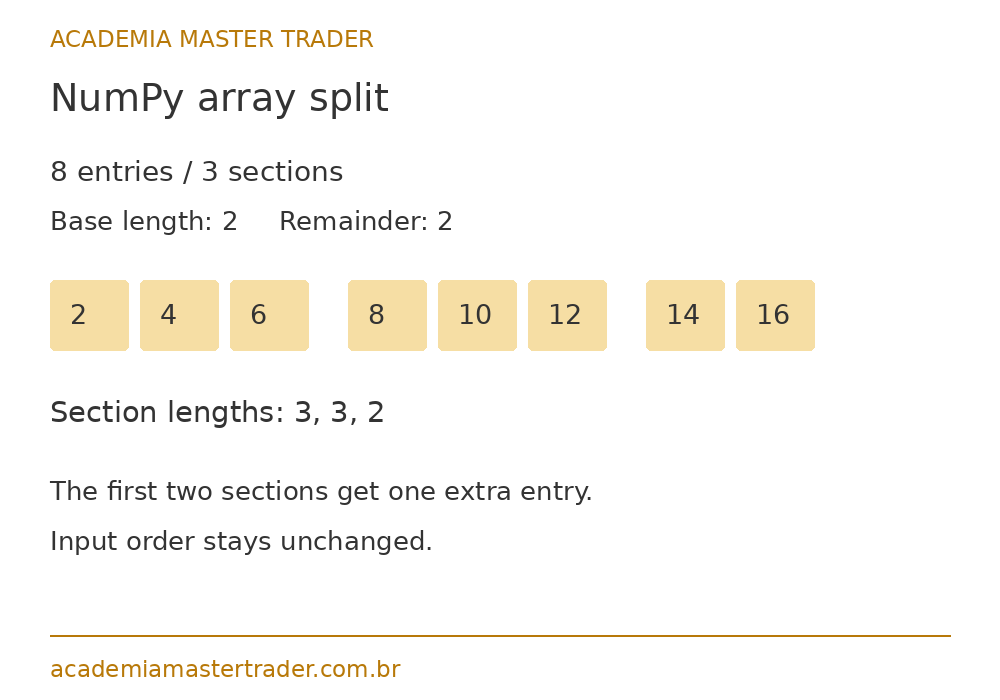
The remainder goes to the first sections
Let the selected axis have length L and let N be the positive integer number of sections. Integer division gives the base section length. The remainder tells you how many sections need one additional entry. Array split places those longer sections first, followed by the sections with the base length.
For eight entries and three sections, the base length is two and the remainder is two. Therefore, the first two sections contain three entries each and the last contains two. For nine entries divided into four sections, the lengths are three, two, two and two. Section lengths differ by at most one when the integer count form is used.
More sections than entries can produce empty arrays
Consider y = np.array([7,9]). The expression np.array_split(y,4) returns four arrays: [7], [9], [] and []. Two entries cannot populate four nonempty sections. Returning the requested number of sections therefore includes empty arrays in this example.
The base section length is zero and the remainder is two. That produces two sections with one entry and two sections with zero entries. Check section sizes before later operations that expect a nonempty input. Do not interpret an empty section as an extra observed value or insert a made up entry to hide it.
Axis selection also works for matrices
Define m = np.array([[1,2,3,4,5],[6,7,8,9,10]]), with shape (2,5). The call np.array_split(m,3,axis=1) divides the five column positions into widths two, two and one. The results are [[1,2],[6,7]], [[3,4],[8,9]] and [[5],[10]].
Their shapes are (2,2), (2,2) and (2,1). Both rows remain present in each section because the operation divides axis one. Selecting axis zero instead would divide the two row positions. Always calculate section sizes from the selected dimension's length, rather than from the total number of entries in the matrix.
Choose the division rule explicitly
For the eight entry vector, np.split(x,3) raises ValueError because its integer form requires equal division. Array split accepts the same section count and distributes the remainder. The distinction is a rule about section sizes, not a change to the numerical values stored in x.
Continue learning with Academia Master Trader at academiamastertrader.com.br and in Aprenda. Write the axis length, section count, base length and remainder before dividing. Inspect the output shapes afterward, including any empty sections. A clear division rule keeps the structure of each section explicit without inventing new data.