NumPy clip limits array values at chosen edges without removing positions
An array can keep its layout while selected values are limited to a chosen interval. NumPy clip replaces values below a lower edge with that edge and values above an upper edge with the upper edge. Academia Master Trader presents this English lesson for readers in Tajikistan. Constructed examples explain how clipping differs from filtering, rescaling and changing the source array in place.
Keep the values already inside the interval
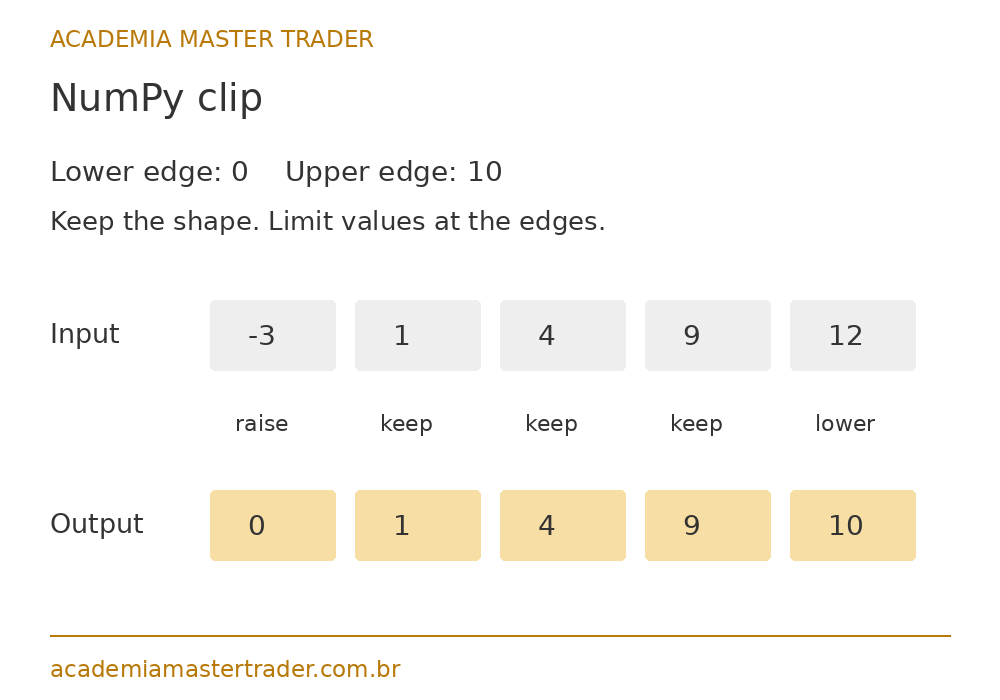
After import numpy as np, define a = np.array([-3,1,4,9,12]). The call np.clip(a,0,10) returns [0,1,4,9,10]. Minus three becomes zero because it is below the lower edge. Twelve becomes ten because it is above the upper edge. One, four and nine stay unchanged.
The result has five entries, just like the input. Clipping does not remove the values outside the interval or shorten the array. Nor does it stretch all values onto a new scale. It only applies the specified limits. A value equal to an edge remains equal to that edge.
A limited value does not identify its original
In the output, zero could have come from an original zero or from any value below zero. Ten could have come from an original ten or from a larger value. Once those distinctions are replaced by the edges, the clipped output alone cannot reconstruct the original entries.
Keep the source when those distinctions matter. In the call above, a is unchanged because no output destination was specified. Store the result under a separate name, such as limited = np.clip(a,0,10), when both the original and the limited representation are useful. The new name describes the transformation without suggesting that the original measurements were incorrect.
Use None for an unlimited edge
A bound can be None when clipping should not apply on that side. For the same a, np.clip(a,None,8) returns [-3,1,4,8,8]. The upper edge becomes eight, while negative values stay untouched because there is no lower limit in this call.
Conversely, np.clip(a,2,None) returns [2,2,4,9,12]. Only the lower edge applies. Twelve remains twelve. This is different from supplying zero as a bound: zero is an actual numeric limit, while None means that the corresponding edge does not perform clipping.
Array bounds can vary by position
The bounds can be arrays that broadcast against the input. Define lower = np.array([0,2,3,4,5]). The call np.clip(a,lower,10) returns [0,2,4,9,10]. Each input entry uses the lower edge at the corresponding position, while the scalar upper edge ten applies throughout.
The lower array is not a second set of observations to concatenate with a. It supplies limits. Check the shapes and the meaning of every bound before applying a position dependent rule. Broadcasting must produce compatible positions for the values and bounds; unrelated lengths do not automatically define a valid arrangement.
Check edge order before clipping
NumPy does not check that the lower edge is less than the upper edge. With reversed scalar edges, np.clip(a,10,0) returns [0,0,0,0,0]. The documented behavior makes every entry equal to the upper edge in this case. Do not expect the function to swap the two numbers or report an interval ordering error.
The optional output argument also changes how the result is stored. The call np.clip(a,0,10,out=a) writes the clipped values into a itself. This deliberately replaces the original entries, unlike the earlier calls. Continue learning with Academia Master Trader at academiamastertrader.com.br and in Aprenda. State the bounds, confirm their order and choose the output destination explicitly.