NumPy clip limits array values to chosen boundaries without removing their positions
Limiting a number and removing it from a sequence are different operations. A clipped array keeps its positions while values beyond the chosen boundaries are replaced by boundary values. Academia Master Trader explains NumPy clip in English for readers in Belgium. The examples use small constructed arrays so the replacements can be followed directly. The boundaries are explicit processing choices, not facts discovered by the function or claims about future market behaviour.
Begin with one lower and one upper bound
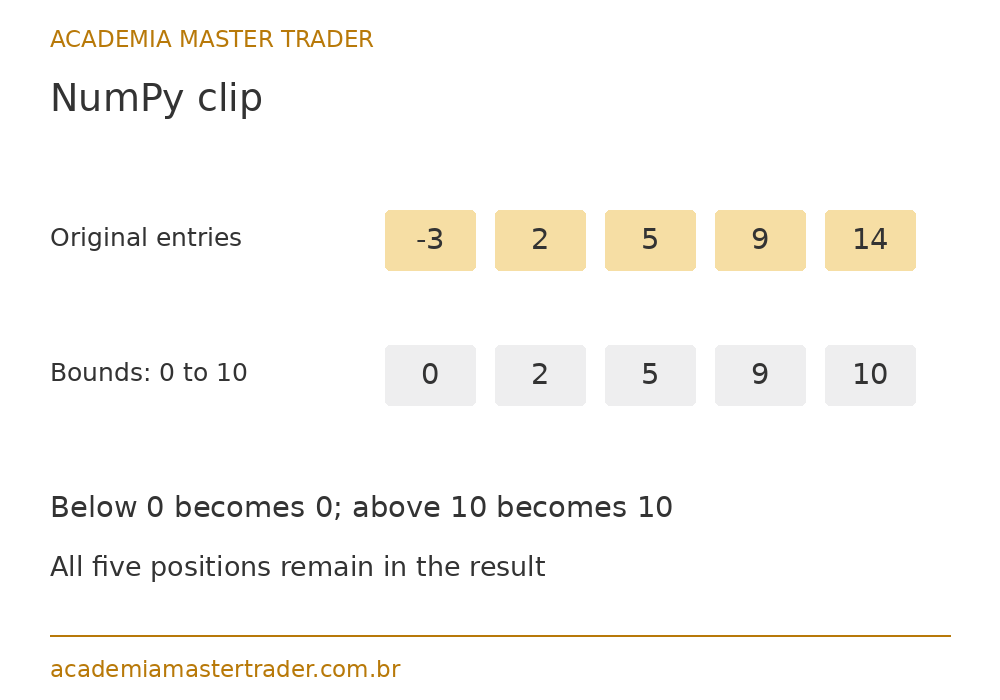
After import numpy as np, define x = np.array([-3,2,5,9,14]). The call np.clip(x,0,10) returns [0,2,5,9,10]. Minus three is below the lower bound zero, so it becomes zero. Fourteen is above the upper bound ten, so it becomes ten. Two, five and nine already lie inside the interval and remain unchanged.
Five input positions produce five output positions in this example. The function does not drop the first or last entry. Nor does it sort the entries or redistribute the values evenly between zero and ten. It applies the boundary rule to each value at its existing position.
Read changed and unchanged entries separately
The figure places the original entries in gold and the clipped output in grey. Compare the two rows position by position. Only the first and fifth values differ. The output zero is a boundary replacement for minus three, not an original observation of zero. Likewise, the final ten replaces fourteen; it does not report that fourteen was originally ten.
This distinction matters whenever an explanation presents processed values alongside source values. Keep the input available if the original magnitude is still needed. Several different inputs can map to the same boundary. For example, both fourteen and twenty would become ten under the same upper limit, so the clipped result alone does not identify which original value produced it.
Apply only the boundary you need
The call np.clip(x,0,None) returns [0,2,5,9,14]. The lower limit applies, while None leaves the upper side unrestricted. By contrast, np.clip(x,None,10) returns [-3,2,5,9,10]. The upper limit applies and the negative first entry remains unchanged.
Choose the boundary from the meaning of the processing task. The function can apply a numerical rule, but it cannot decide whether that rule is suitable for the data. Write the limit and the reason for using it in the surrounding explanation, rather than presenting a clipped output as though no transformation occurred.
Bounds can also vary by position
For the same x, np.clip(x,[0,3,0,10,0],12) returns [0,3,5,10,12]. The lower limits now vary across the five positions, while the upper limit remains twelve. The second input two becomes three because its own lower limit is three. The fourth input nine becomes ten because its own lower limit is ten.
NumPy broadcasts the bounds against the input. In this example, the lower bound array has the same length as x and the single upper bound applies to every position. A more complex shape needs an explicit explanation of which limit belongs to which entries. The compact syntax does not make that association optional.
Check the boundary order before relying on the result
NumPy does not check that the lower boundary is smaller than the upper boundary. With reversed scalar limits, np.clip(x,10,0) returns [0,0,0,0,0]. This is defined behaviour, not an instruction to treat zero as a sensible result for every application. Confirm the intended order of the bounds before interpreting the output.
Continue learning with Academia Master Trader at academiamastertrader.com.br and in Aprenda. Record the original values, lower and upper boundaries, any position specific limits and the resulting shape. Then identify which entries changed. That keeps clipping distinct from filtering, sorting and recovering the original measurements.