NumPy clip limits values to boundaries without removing their positions
Some array operations select observations. Others change the values stored at the existing positions. NumPy's clip belongs to the second group: it limits values to the edges of a specified interval. Values below the lower boundary become that boundary, and values above the upper boundary become the upper boundary.
This is a numerical transformation, not a deletion rule. It does not mean that observations outside an interval disappear from the result. Understanding that distinction is useful when comparing an original array with a processed array, because the same positions can now contain different numbers.
Follow each input to its output
Suppose a one-dimensional array a contains -2, 3, 8, and 12. We choose a lower boundary of 0 and an upper boundary of 10. The first value, -2, becomes 0. The middle values 3 and 8 stay as they are. The final value, 12, becomes 10. The output is 0, 3, 8, 10.
np.clip(a, 0, 10)
The output has four elements, just like the input. Nothing has been removed from this example. Two values have changed and two have stayed the same. The result should therefore be described as a bounded version of the input, not as a smaller selection of the original observations.
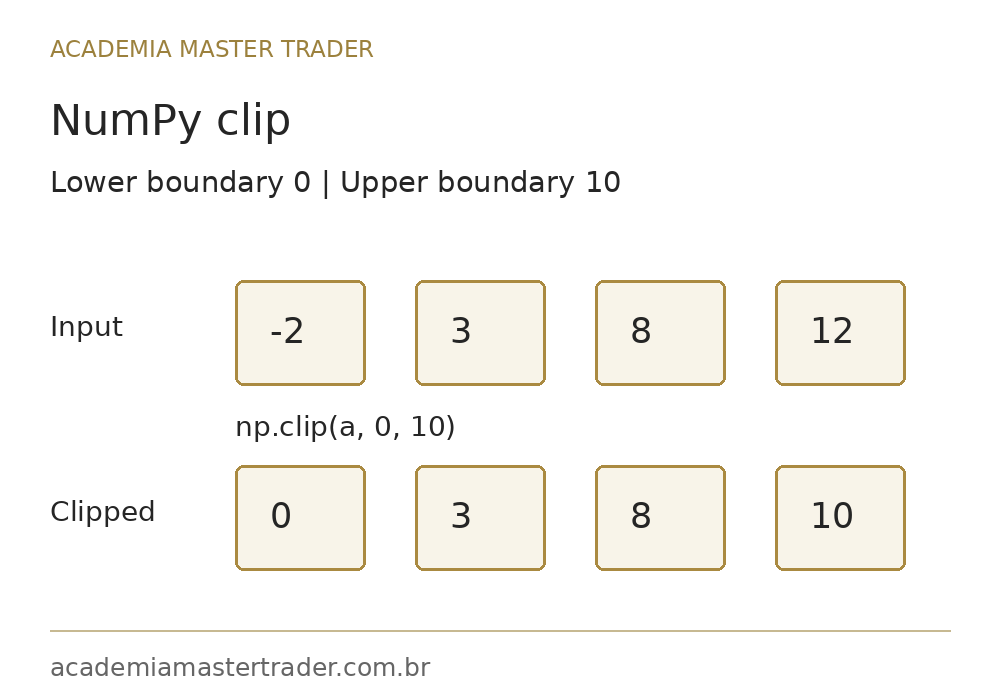
The figure aligns the original and transformed values by position. It shows why clipping is different from filtering: the first and last positions remain present. They now hold boundary values. A reader looking only at the output would not know how far the original values were outside the interval.
A boundary is a rule, not a recovered observation
The new zero in the first position was chosen by the transformation rule. It does not mean that the original observation was zero. Likewise, the final 10 does not show that the last input was exactly 10. The original values were -2 and 12, and the clipping rule replaced them.
This matters when naming an array or writing a caption. Original observations and clipped values are different data products. Keep that difference visible rather than presenting the transformed array as though nothing has changed. A short statement of the lower and upper boundaries helps the reader understand the result.
Clipping also does not rescale the whole array to fill the interval. In the example, 3 stays 3 and 8 stays 8. The function has not stretched the spacing between the interior values or converted their units. It has applied the specified lower and upper limits.
Values at the edges stay at the edges
NumPy describes replacements for values smaller than the lower boundary and larger than the upper boundary. A value already equal to a boundary is already within the requested limits. For an input of 0, 4, 10 with boundaries 0 and 10, the returned values remain 0, 4, 10.
Several different inputs can produce the same clipped output. For instance, both -2 and -5 would become 0 under this rule. The output alone therefore cannot reconstruct those original inputs. Preserve the original array separately when the later explanation needs the original measurements.
Choosing boundaries is a separate decision from calling the function. The software can apply the numbers it receives, but those numbers still need a meaning in the workflow. This example uses small integers to explain array behaviour. It does not establish suitable limits for an unrelated dataset.
One-sided clipping uses None
The documentation allows None for either boundary. Using None for the lower edge leaves that side unclipped. Using None for the upper edge leaves the upper side unclipped. This makes it possible to state a one-sided rule rather than supplying an artificial second boundary.
For our original input, clipping only above 10 gives -2, 3, 8, 10. The value -2 remains unchanged because there is no lower limit in that call. Clipping only below 0 gives 0, 3, 8, 12 instead. The value 12 stays unchanged because that call supplies no upper limit.
np.clip(a, None, 10)
np.clip(a, 0, None)
Read both arguments when explaining the result. A single boundary does not imply that the opposite side has been set to zero or to another default number. It means that clipping is not performed on that edge.
Output placement and boundary order
The out argument can place the result into a supplied array, including the input array for an in-place operation. NumPy's documentation includes that use. It changes where the result is written, so an explanation should not promise that the original array remains available after an in-place call.
np.clip(a, 0, 10, out=a)
That form should be used deliberately. A separate result array and an in-place transformation may produce the same displayed numbers while leaving different data available for later steps. Check which object is being read when comparing before and after values.
The order of the boundaries also needs attention. NumPy states that clip does not check whether the lower boundary is smaller than the upper boundary. Its documented behaviour when the lower argument exceeds the upper argument is to return values equal to the upper argument. Do not interpret reversed arguments as an instruction to swap the limits automatically.
Academia Master Trader publishes educational material about data organisation and numerical methods. Visit academiamastertrader.com.br to explore more topics and continue learning. When reading a clipped array, state the boundaries, identify which values changed, and keep the transformed result distinct from the original observations.