NumPy compress selects slices using a one dimensional condition along an axis
A sequence of true and false entries can describe which positions to keep from an array. It is different from a sequence of integer indices because every condition entry corresponds to its own position along the selected axis. Academia Master Trader explains NumPy compress in English for readers in Slovakia. A small matrix lets us compare keeping columns, keeping rows and selecting from the flattened input. The examples describe data organisation, not financial outcomes or extra observations. Every output can be traced back to the supplied integers.
Start with the shape and condition
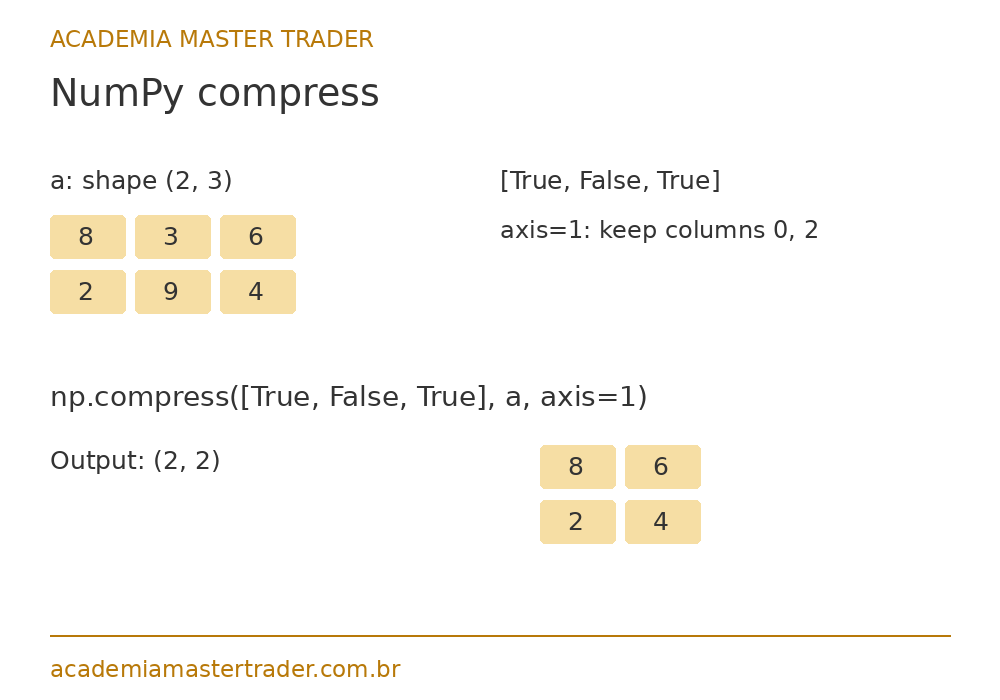
After import numpy as np, define a = np.array([[8,3,6],[2,9,4]]). Its shape is (2,3), with two rows and three columns. Define the condition as [True,False,True]. Its three entries refer to positions zero, one and two in that order. True keeps the corresponding position; false leaves it out. The condition itself does not contain the numerical values that will appear in the result.
The call np.compress([True,False,True],a,axis=1) gives [[8,6],[2,4]], with shape (2,2). Columns zero and two are kept, while column one is omitted. Both rows remain represented. The selected column order stays the same as in the source: the leftmost retained column comes before the rightmost retained column. The function does not sort the retained entries by value.
Match the condition to positions
The first true entry keeps eight and two together as one column. The false entry omits three and nine together. The last true entry keeps six and four together. This is a shared decision about columns across the matrix, not a separate numerical comparison for each individual cell. The selected axis tells us what a condition position addresses.
The output contains four entries because two retained columns each contain two rows. Counting true entries tells us the selected axis length in this example. It does not directly give the total element count of a multidimensional result. The unchanged dimensions still contribute to that total. Record the full output shape before describing the number of retained values.
Read the figure as a position map
The figure places the condition beside the input matrix and shows the column result underneath. Follow four from input coordinate (1,2) to output coordinate (1,1). Its row position stays one, while its local column position becomes one because the original middle column was omitted. Nothing has been subtracted from the numerical value four. Selection changes the arrangement, not the retained values.
A false entry does not replace a column with zeros. The omitted column is absent from the output, so the shape changes from (2,3) to (2,2). This distinction matters when reading printed arrays: retaining a zero value and omitting a position are different operations. Our input contains no zero value, which keeps the contrast focused on the structure.
Select rows with the row axis
The call np.compress([False,True],a,axis=0) gives [[2,9,4]], with shape (1,3). The condition now addresses the two row positions. It omits the first row and keeps the second. All three columns remain in the output. The result is still two dimensional, even though it has only one row. The outer brackets record that retained row dimension.
The row condition has length two, matching the selected row axis. The earlier column condition had length three, matching the selected column axis. Naming the axis makes the meaning explicit rather than relying on the visual orientation of the printed matrix. A condition should be interpreted against the selected dimension, not against whichever dimension looks longest on screen.
Notice a shorter condition and an omitted axis
NumPy documents that a condition shorter than the selected axis limits consideration to that condition's length. Here np.compress([True,False],a,axis=1) gives [[8],[2]], with shape (2,1). The third input column is not considered. A short condition is therefore not automatically extended with true entries. Write the condition length beside the axis length to make that behaviour visible.
When axis is omitted, the function works on the flattened input. The call np.compress([True,False,True],a) gives [8,6], with shape (2,). It considers the first three flattened positions, not whole columns from both rows. Continue learning with Academia Master Trader at academiamastertrader.com.br and in Aprenda. Record the selected axis, condition length and full output shape. Then trace a retained coordinate to explain exactly what was kept.