NumPy concatenate joins arrays along an existing axis without inventing a new one
Combining two arrays requires more than placing their printed values next to each other. Their shapes must fit the axis along which they are joined. Academia Master Trader explains NumPy concatenate in English for readers in Estonia. We will use two small matrices to compare joining rows, joining columns and flattening before joining. The aim is to connect each output with a clear shape rule. These examples describe the organisation of numbers, not financial outcomes or additional observations beyond the supplied inputs.
Record both input shapes
After import numpy as np, define a = np.array([[8,3],[2,9]]) and b = np.array([[6,4],[7,5]]). Each array has shape (2,2), with two rows and two columns. Array a contains four elements and array b contains another four. We will pass them as a sequence using (a,b) inside the function call. The order of that sequence determines which input comes first.
The documentation states that concatenate joins arrays along an existing axis. Shapes must match except in the dimension selected by axis. For these two inputs, both dimensions match already, so either axis zero or axis one is available. We will keep the inputs unchanged and derive each result separately. One output is not the starting point for the next example.
Join along the row axis
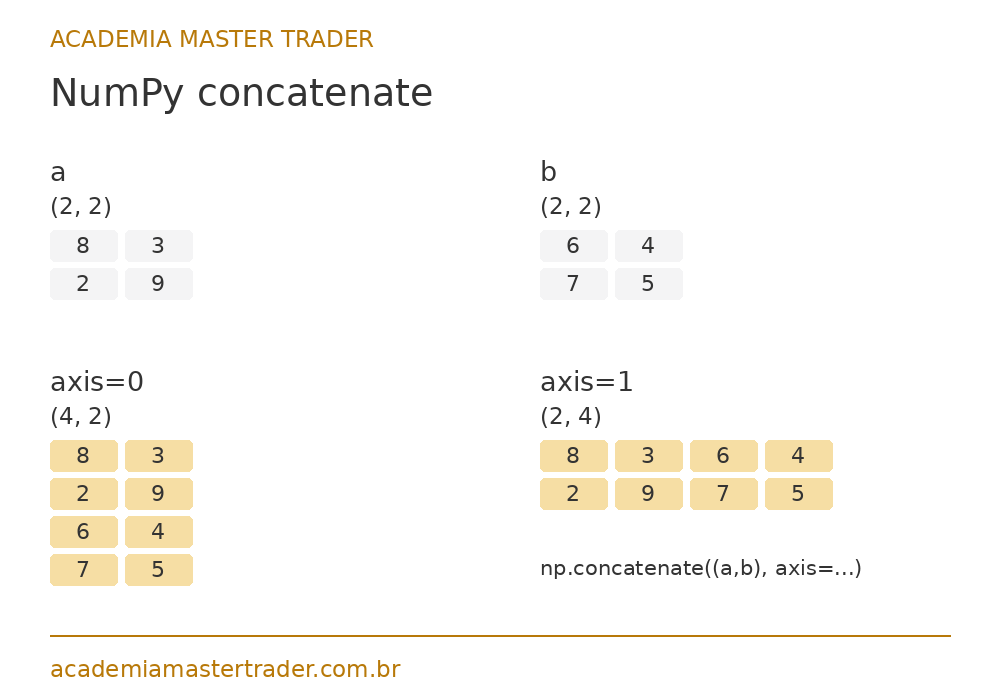
The call np.concatenate((a,b),axis=0) gives [[8,3],[2,9],[6,4],[7,5]] with shape (4,2). The two rows from a come first, followed by the two rows from b. The number of rows becomes four, while the number of columns remains two. This is possible because both inputs have the same column length.
Follow the row six and four. In b it occupies the first row, at row index zero. In the result it appears after both rows of a, at row index two. Its two values remain together in their original order. Concatenate does not sort the rows by value. It joins the inputs according to the supplied sequence and selected axis.
Join along the column axis
The call np.concatenate((a,b),axis=1) gives [[8,3,6,4],[2,9,7,5]] with shape (2,4). The first row combines the first row of a with the first row of b. The second row combines their second rows. The number of rows remains two, while the number of columns becomes four. Both inputs must therefore agree in their row length.
The same eight input elements appear in both results, but their positions differ. Four appears at the end of the first output row when we join columns. When we join rows, it appears in the second column of the third output row. Reading only the total element count would not distinguish these arrangements. Shape and axis explain the difference.
Read the figure and the flat alternative
The figure records the two input matrices and the two explicit axis results. It labels each result with its resulting shape. Read the row join as one matrix placed after the other along axis zero. Read the column join by matching corresponding rows along axis one. The new lengths belong to existing axes; the output is still two dimensional in both cases.
For np.concatenate((a,b),axis=None), the result is [8,3,2,9,6,4,7,5] with shape (8,). The arrays are flattened before joining. This is different from omitting the axis argument, whose default is zero. Writing None deliberately selects a flat result. Leaving the argument out in this example gives the row join, not the flat sequence.
Check the dimensions that must agree
Suppose c = np.array([[1,6]]), with shape (1,2). Joining a and c along axis zero works because their column lengths are both two. The result has shape (3,2). Their row lengths may differ because rows are the dimension being joined. The other dimension must match.
Joining a and c along axis one does not meet that rule: a has two rows and c has one. Concatenate does not automatically repeat c to fill the missing row. The shape requirement remains in force outside the selected axis. This is why checking each input shape before combining values is more useful than guessing from the appearance of a short printed array.
Continue learning with Academia Master Trader at academiamastertrader.com.br and in Aprenda. Write the input shapes, choose the existing axis and check every other dimension for agreement. Then write the output shape before tracing individual values. This makes joining arrays a precise structural operation rather than an ambiguous instruction to put numbers together.