NumPy cumprod keeps a running product, not a running sum
A sequence can describe individual values, a total, or a calculation that develops one position at a time. These are different views of the same data. NumPy's cumprod returns cumulative products along an axis. Each output records the product reached at that position, including the current input. It does not add the values together.
This distinction is useful before writing code. A running sum answers how much has been added so far. A running product answers what the values have multiplied to so far. The function name does not decide which question your data requires. That choice comes from the meaning of the inputs and the question you want to answer.
Four inputs, four intermediate products
Suppose a one-dimensional array a contains 2, 3, 2, and 4 in that order. The first cumulative product is 2. Multiplying by the next input gives 6. Multiplying that result by 2 gives 12. The final multiplication by 4 gives 48. The output is therefore 2, 6, 12, 48.
np.cumprod(a)
There are four output elements, not just one final total. The last element describes the product of all four inputs. Earlier elements describe shorter prefixes of the same sequence. The second output, for example, is the product of the first two inputs, not a replacement measurement for the second input.
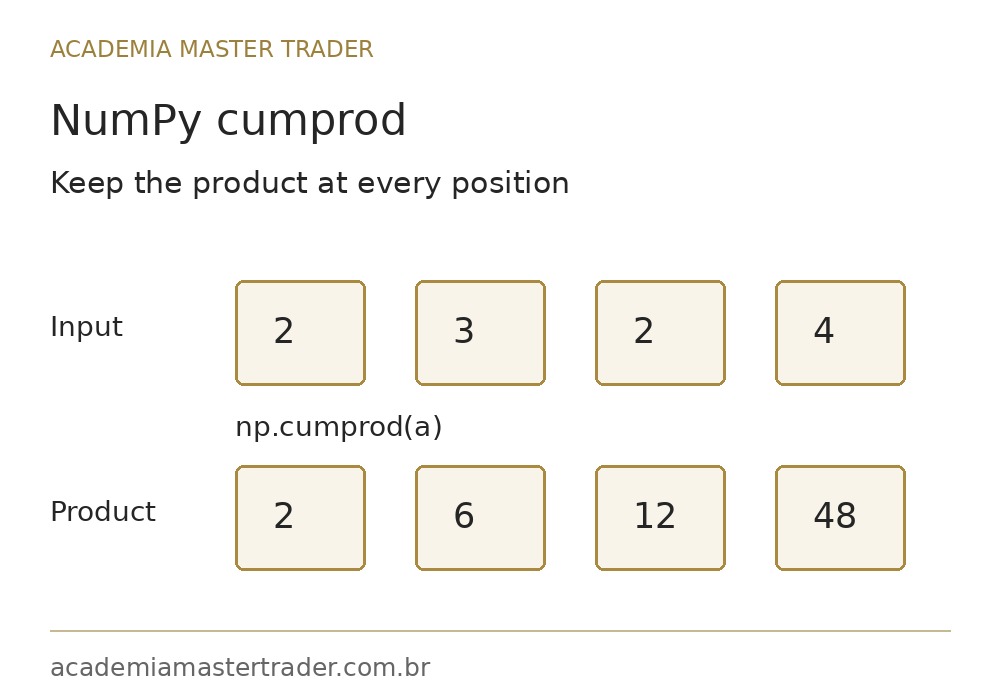
The figure separates inputs from accumulated results. Matching positions are aligned so that the reader can see what each output includes. The number 12 belongs to the third output because it combines the first three inputs. It is not the sum of those inputs, and it does not describe the third input alone.
Multiplication is not addition
For the same inputs, a cumulative sum would be 2, 5, 7, 11. A cumulative product is 2, 6, 12, 48. Both outputs retain information at each position, but the operation connecting those positions is different. Similar output shapes do not make the results interchangeable.
Labels should name the operation rather than simply say accumulated values. A reader who sees a rising sequence cannot infer whether it came from addition, multiplication, or another rule. Writing cumulative product beside the result gives the sequence an explicit meaning without requiring someone to reconstruct the calculation.
Nor should a numeric example be treated as a claim about a real-world outcome. Here the inputs are small integers chosen to explain array behavior. Their multiplication illustrates a computation. It does not establish what operation is suitable for an unrelated dataset or what any measured process will do.
The axis defines where each sequence starts
Now consider a two-row, three-column array. The first row contains 2, 3, 2. The second row contains 4, 2, 5. With axis=1, cumprod works across the columns within each row. The first output row is 2, 6, 12. The second output row is 4, 8, 40.
np.cumprod(a, axis=1)
Each row starts its own cumulative calculation. The first output in the second row is 4. It does not continue multiplying from the last result in the first row. This is why the axis is part of the explanation, not a minor display choice added after the numbers have been calculated.
With axis=0, the cumulative calculation moves down the rows within each column. The first output row is 2, 3, 2. The second output row is 8, 6, 10. Each second-row value combines the two inputs from its own column.
np.cumprod(a, axis=0)
The input has not changed between these calls. What changes is the set of sequences used for accumulation. Report the axis together with the result so that a reader knows whether each output belongs to a row sequence or a column sequence.
Omitting the axis changes the structure
The NumPy documentation says that cumprod flattens its input by default. For the two-row example, the flattened sequence is 2, 3, 2, 4, 2, 5. Its cumulative products are 2, 6, 12, 48, 96, 480. This is one sequence rather than two independent row sequences.
The output still has six elements, but it is not the same result as the two-dimensional row calculation. Equal element counts do not imply equal meaning. Before placing a result beside another array, check which input positions contributed to each accumulated value.
Data type belongs in the explanation
The dtype argument controls the type used for the returned array and for the accumulator that performs the multiplications. NumPy documents a default rule based on the input type, including promotion of lower-precision integer inputs to the platform's default integer type. Do not assume that every input type follows an identical path.
The documentation also notes that integer arithmetic is modular and does not raise an error on overflow. That is a property to account for when choosing a type. The small examples here explain the order of multiplication; they do not remove the need to consider the numeric range of another calculation.
Academia Master Trader publishes educational material about data organization and numerical methods. Visit academiamastertrader.com.br to explore more topics and continue learning. When reading a cumulative product, identify the input order, the axis, and the data type before explaining what each output position represents.