NumPy cumsum keeps every running total rather than returning only one final sum
A running total describes what has accumulated up to each position in a sequence. NumPy cumsum returns those cumulative sums. Its output keeps the intermediate totals, so a reader can follow how the result changes as each input entry joins the accumulation. It is different from asking only for one final total.
Academia Master Trader presents this lesson for English-language study in Saint Vincent and the Grenadines. All values below are invented teaching numbers. They are not prices, balances, trading signals or financial results. The examples explain array order, axis choice and output shape before considering what an accumulated value might represent.
Build the total one entry at a time
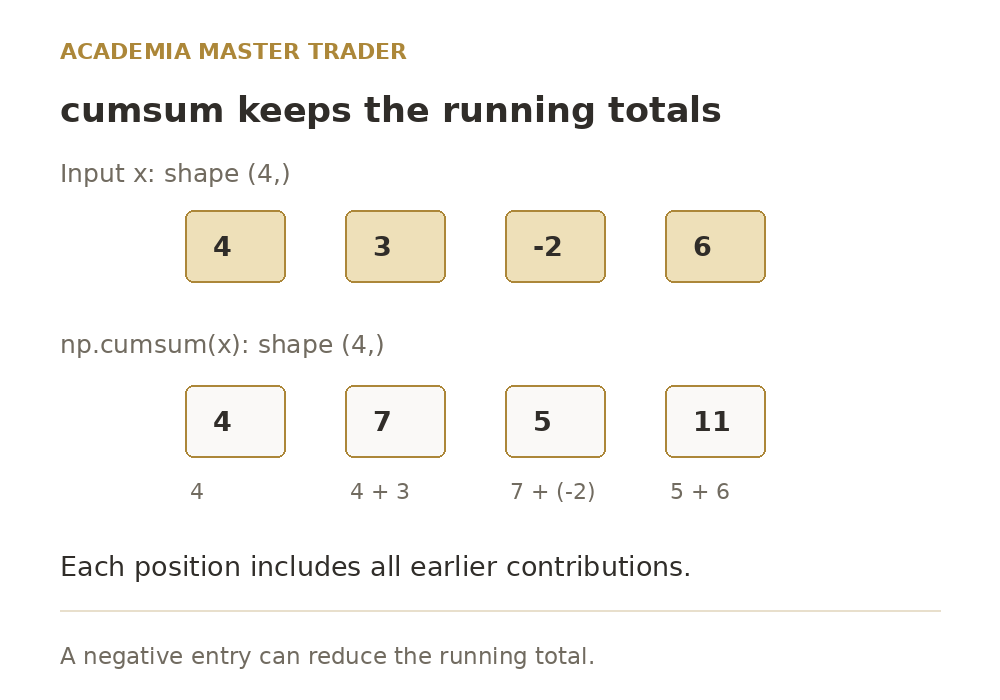
Let x be [4,3,-2,6]. The expression np.cumsum(x) returns [4,7,5,11]. The first total is 4. Adding the next entry, 3, gives 7. Adding -2 gives 5, and adding 6 gives 11. Each output position includes the input entry at that position and all preceding entries in this sequence.
A cumulative sum does not have to increase at every step. The negative input entry reduces the running total from 7 to 5. Calling an output cumulative explains how it was calculated, not whether its values must rise. The sign and magnitude of each added entry determine the next total.
Preserve the distinction between entries and totals
The input entries and output totals answer different questions. The input value 3 describes one contribution in this example. The output value 7 describes the accumulation of the first two contributions. They occupy corresponding positions, but they do not have the same meaning.
This difference matters in labels and captions. A table headed only values can hide whether a column contains individual contributions or running totals. Name the cumulative column explicitly and state the order in which the contributions were accumulated. A running total depends on the sequence leading to that position.
Read the default matrix behaviour carefully
Let a contain rows [2,5] and [8,11], with shape (2,2). When no axis is supplied, np.cumsum(a) accumulates over the flattened array. The reading sequence is 2,5,8,11, and the output is [2,7,15,26]. The result is one-dimensional, with four entries.
The accumulation does not restart when the reading sequence crosses the original row boundary. The third total is 2+5+8=15, not simply 8. Omitting an axis therefore expresses a different operation from computing an independent running total inside each row of the original matrix.
Set axis 1 for separate row accumulations
The expression np.cumsum(a,axis=1) returns rows [2,7] and [8,19]. Within each row, the accumulation follows the column direction. The first row starts with 2 and then adds 5. The second row starts separately with 8 and then adds 11.
The output keeps shape (2,2). Each row contains its own sequence of running totals. There is no step that adds the final total of the first row to the beginning of the second. Stating where the accumulation restarts helps explain why these values differ from the flattened result.
Set axis 0 for separate column accumulations
For np.cumsum(a,axis=0), the output rows are [2,5] and [10,16]. The first row provides the initial totals for each column. The second row contains 2+8=10 in the first column and 5+11=16 in the second column. Again, the output shape remains (2,2).
Read each column as its own ordered sequence. Selecting axis 0 does not combine all columns into a single total. It describes the direction of accumulation while preserving the other positions. Comparing the flattened, axis 1 and axis 0 outputs makes the role of the axis visible.
Choose a numerical type that fits the accumulation
NumPy cumsum uses an accumulator whose type can be set with dtype. The documentation describes a default promotion for integer inputs narrower than the platform's default integer. That default is useful to know, but it is not a reason to ignore the scale of values that may be accumulated.
Integer arithmetic is modular when overflow occurs, and the documentation says no error is raised for that overflow. Floating-point accumulation has different concerns: rounding can affect the final value. Choose the numerical type with the calculation's range and precision in mind rather than assuming every running total is exact.
Separate a running path from one final result
For floating-point values, the final entry of cumsum may differ slightly from a separate sum calculation. NumPy's documentation explains that sum may use a pairwise summation routine, reducing rounding error. The two expressions can follow different numerical accumulation paths even when their mathematical total is described by the same addition.
Continue learning with Academia Master Trader at academiamastertrader.com.br. Aprenda opens the educational material. Write the contribution order, select the axis and label each output as a running total. Those steps make the accumulation clear without confusing a larger cumulative value with a new individual contribution.