NumPy cumsum records running totals in the order an array is supplied
A final total compresses a whole sequence into one number. A cumulative sum records the total reached at each position along that sequence. Academia Master Trader presents this English lesson for readers in Turkmenistan. NumPy cumsum provides the running totals, while the analyst remains responsible for choosing a meaningful order, axis and numeric type. Constructed examples show what each returned entry includes.
Each output includes the current entry
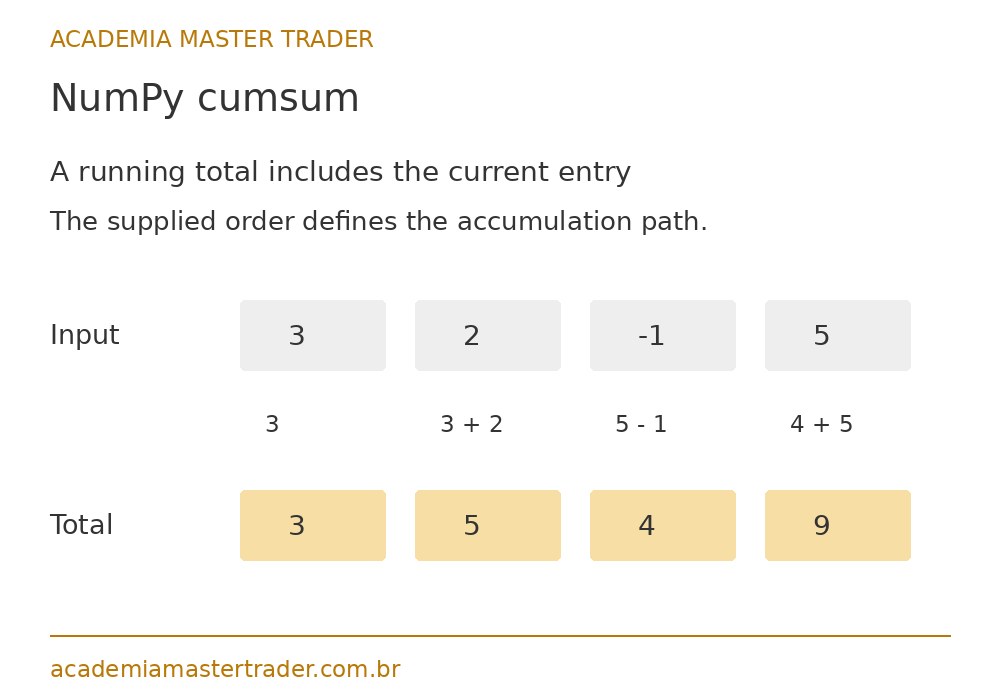
After import numpy as np, define a = np.array([3,2,-1,5]). The call np.cumsum(a) returns [3,5,4,9]. The first output is three. The second is three plus two. The third includes the next entry, minus one, so the running total becomes four. The last output includes all four entries and equals nine.
The output has four entries rather than one. It does not automatically begin with a separate zero, and it is not an average. A negative input can make the cumulative sum decrease. The operation follows the sequence as supplied; it does not reorder values or infer which observation should come first.
The path depends on the input order
Reorder the same numbers as b = np.array([5,-1,2,3]). The call np.cumsum(b) returns [5,4,6,9]. The last value is again nine in these exact integer examples, but the intermediate totals differ. A running total therefore carries information about the chosen arrangement, not merely about the collection of values.
If entries represent observations over time, keep the time coordinates and confirm their order separately. Cumsum does not inspect labels or decide whether the sequence is chronological. If entries belong to several unrelated groups, decide where accumulation should restart rather than treating a flattened collection as one continuous sequence without explanation.
The default flattens a matrix
Define m = np.array([[2,4,1],[3,5,2]]). The default call np.cumsum(m) returns [2,6,7,10,15,17]. With no axis specified, NumPy accumulates over the flattened array. The result is a one dimensional vector of six totals, even though the input has shape (2,3).
Here the first row contributes two, four and one before the second row contributes three, five and two. The first total associated with the second row is ten, not three, because the default accumulation continues from the first row. Keep that boundary visible when interpreting a flattened result.
An explicit axis preserves the matrix shape
The call np.cumsum(m,axis=1) returns [[2,6,7],[3,8,10]]. It accumulates across each row independently. The second row begins at three because its running total does not include entries from the first row. Both input and output have shape (2,3).
The call np.cumsum(m,axis=0) instead returns [[2,4,1],[5,9,3]]. It accumulates down each column. At the second row, five comes from two plus three, nine from four plus five, and three from one plus two. Name the data meaning of each axis before choosing the direction of accumulation.
Choose a suitable numeric type
The dtype argument controls the output and accumulator type. For example, np.cumsum(a,dtype=np.float64) returns floating point totals [3.,5.,4.,9.]. This changes their numeric representation, not the interpretation of the underlying entries.
Fixed width integer arithmetic can overflow without raising an error, so choose a type suitable for the expected totals. Floating point accumulation can also round, and its last entry may differ from a separate sum calculation. Continue learning with Academia Master Trader at academiamastertrader.com.br and in Aprenda. Record the order, axis and accumulator type with the running totals.