NumPy diag extracts a matrix diagonal or builds a diagonal matrix from a vector
The same NumPy function can perform two different structural operations depending on the number of dimensions in its input. With a matrix, diag extracts entries along a chosen diagonal. With a vector, it constructs a two-dimensional array and places the supplied values on a chosen diagonal. Recognising that difference comes before interpreting the output.
Academia Master Trader presents this explanation in English for readers in Zambia. The examples describe numerical arrays and positions only. They do not represent prices, trading signals or financial results. The aim is to follow which entries are selected, which positions are filled and how the output shape relates to the input.
Extract the main diagonal from a matrix
Consider a matrix x with rows [1,2,3], [4,5,6] and [7,8,9]. Its shape is (3,3). The expression np.diag(x) returns the vector [1,5,9], whose shape is (3,). These entries occupy the main diagonal, from the upper-left position towards the lower-right position.
The main diagonal contains positions where the row index equals the column index. Using zero-based indices, the selected coordinates are (0,0), (1,1) and (2,2). The function follows that coordinate relationship. It does not select the smallest value in each row or search for a numerical pattern among the entries.
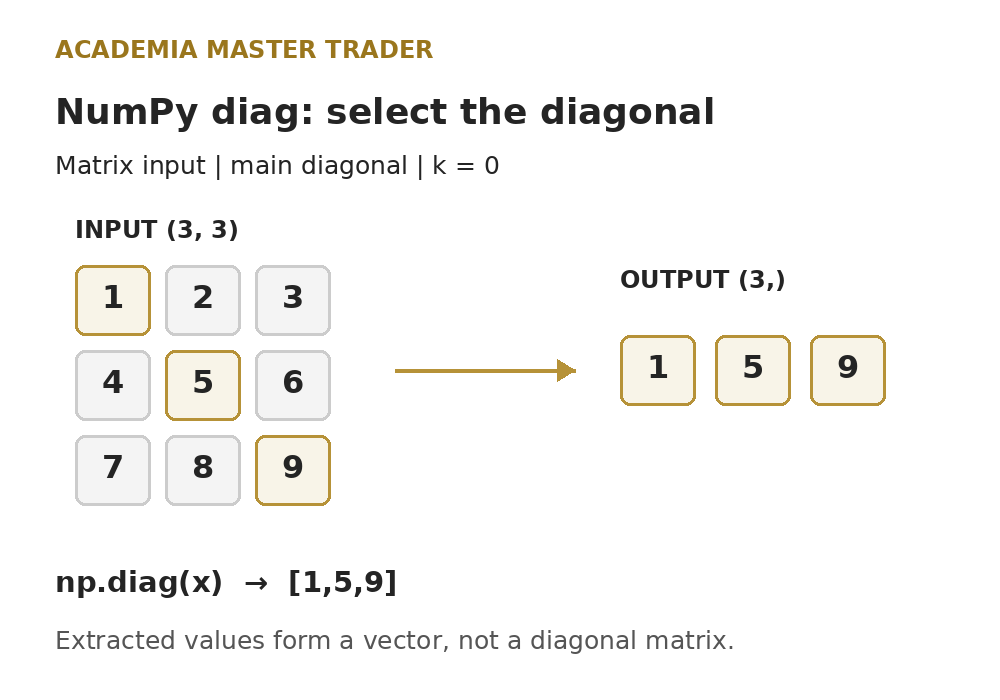
The result is a vector rather than a matrix with empty off-diagonal positions. This distinction matters when another operation expects a two-dimensional input. A list of diagonal values and a diagonal matrix are different structures, even when they contain the same selected numbers.
Move to a neighbouring diagonal
The parameter k selects the diagonal. Its default value is zero, which means the main diagonal. A positive value refers to a diagonal above the main diagonal. For the same x, np.diag(x,k=1) returns [2,6], selecting coordinates (0,1) and (1,2).
A negative value refers to a diagonal below the main diagonal. The expression np.diag(x,k=-1) returns [4,8], from coordinates (1,0) and (2,1). Both neighbouring diagonals are shorter than the main diagonal in this square example because they start away from a corner.
The offset is a position rule, not an amount added to each selected value. Moving from k equal to zero to k equal to one changes which entries are extracted. It does not transform [1,5,9] into [2,6,10]. The output length follows the available positions on the chosen diagonal.
A vector changes the operation
Now let v be the one-dimensional array [2,5,8]. The expression np.diag(v) constructs a matrix with rows [2,0,0], [0,5,0] and [0,0,8]. The values from v occupy the main diagonal, and the remaining entries are zero.
The shape changes from (3,) to (3,3). Unlike extraction, this operation creates the surrounding two-dimensional arrangement. The zero values are part of the output. They are not missing observations, blank cells or values recovered from some earlier matrix.
For a vector input, an offset moves the supplied values to a different diagonal of the constructed array. The example np.diag([2,5,8],k=1) produces a four-by-four array with two, five and eight immediately above the main diagonal. The extra dimension length provides room for that offset.
Extraction followed by construction is not restoration
Apply diag to the matrix x, then apply diag again to the resulting vector. The first call gives [1,5,9]. The second constructs rows [1,0,0], [0,5,0] and [0,0,9]. This is not the original x, because the off-diagonal entries from x were not retained in the extracted vector.
The two calls therefore do not undo each other in the general case. One selects a subset of entries; the other builds a matrix with zeros elsewhere. Matching the original shape after the second call does not recover the information absent from the intermediate result.
That distinction is useful whenever code switches between a compact collection of selected values and a larger arranged structure. Record the meaning of the intermediate array rather than judging the process only by the final number of rows and columns.
Keep extraction separate from addition
Extracting a diagonal leaves its entries as separate elements. For x, the result [1,5,9] is different from the scalar fifteen obtained by adding those three numbers. NumPy also documents trace as a separate operation for summing along diagonals.
A later calculation may deliberately use the extracted vector, but diag itself should not be described as performing that calculation. State whether the program needs positions, a vector of values, a diagonal matrix or a sum. Those outputs answer different questions.
Check storage assumptions before changing values
The official diag reference directs readers to the more detailed diagonal documentation when they plan to write to an extracted result, because copy and view behaviour depends on the NumPy version. An introductory example should not promise that changing the extracted array always changes the original matrix, or that it never does.
Continue learning with Academia Master Trader at academiamastertrader.com.br. Aprenda provides access to educational material. Identify whether the input is a vector or a matrix, name the offset and describe the resulting shape. These steps keep diagonal selection distinct from matrix construction and from any arithmetic performed afterwards.