NumPy diff describes changes between neighbours, not the original values
A sequence of measurements and a sequence of changes answer different questions. The original values tell us what was recorded at each position. First differences tell us how one recorded value compares with its neighbour. NumPy's diff calculates discrete differences along an axis, using the next element minus the current element for a first difference.
Keeping those roles separate makes a numerical explanation easier to follow. A difference is not a replacement label for the original observation. It comes from a pair of observations. Before interpreting the result, identify the order of the input and the axis along which the pairs are formed.
Four observations produce three first differences
Suppose a one-dimensional array a contains 4, 7, 6, and 10. The difference from 4 to 7 is 3. The difference from 7 to 6 is minus 1. The difference from 6 to 10 is 4. The first-difference output is therefore 3, -1, 4.
np.diff(a)
There are three results because four neighbouring values form three adjacent pairs. Without adding boundary values, there is no earlier input to pair with the first observation. The function does not invent that missing value simply to make the output as long as the input.
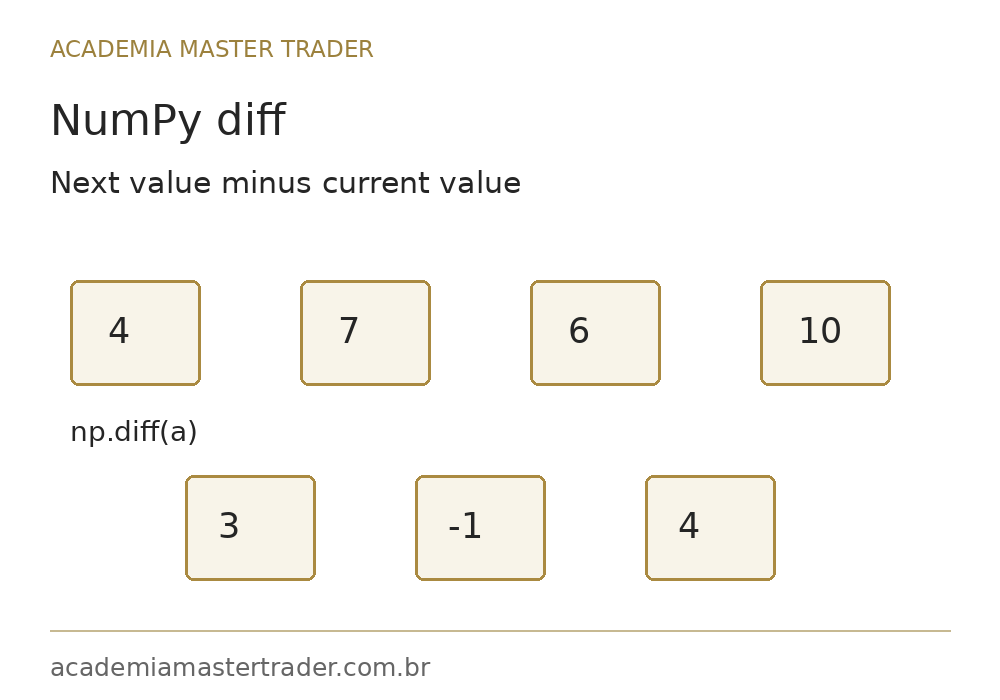
The figure places each result between the two inputs that produce it. This layout makes the pairing explicit. The result -1 describes the move from 7 to 6. It does not say that either original observation was negative, and it does not describe the distance from the first input to the last.
Read the subtraction in the right order
The order of subtraction matters. NumPy documents the first difference as the next element minus the current element. Reversing those terms reverses the sign for ordinary signed-number examples. A positive result in this example indicates that the next value is greater; a negative result indicates that it is smaller.
The number 3 is an absolute difference in the units of these inputs. It is not automatically a percentage change or a rate per unit of time. Those interpretations require their own definitions and, where relevant, the spacing between observations. Calling diff alone does not supply that extra information.
For clarity, label a column of output as adjacent differences rather than simply values. A reader should not need to infer whether a number is an observation, a change, an index, or a total. A short label can preserve the meaning of a calculation when the result is moved into a table or report.
Second differences compare the first differences
The n argument controls how many times the differencing operation is applied. For the example, the first differences are 3, -1, 4. Applying the same rule again gives -4 and 5: minus 1 minus 3 is minus 4, and 4 minus minus 1 is 5.
np.diff(a, n=2)
A second difference is therefore not found by subtracting two from each input. Nor does it simply mean comparing an input with the observation two positions ahead. NumPy describes higher differences as repeated applications of diff. The output of one stage becomes the input to the next stage.
With these four inputs, first differencing produces three elements and second differencing produces two. This shrinking dimension belongs to the calculation. Preserve it in an explanation instead of silently attaching the results to every original position as if no pairing had taken place.
The default axis is the last axis
Consider a two-row, three-column array. The first row contains 4, 7, 6. The second row contains 2, 5, 9. By default, diff operates along the last axis. For this two-dimensional array, that forms adjacent pairs within each row. The first output row is 3, -1; the second is 3, 4.
np.diff(a)
Each row is handled separately. The function does not continue from the last input in the first row to the first input in the second row. This differs from a function that flattens the entire input by default. Read the documented axis rule for the specific operation rather than carrying a default over from another function.
With axis=0, the pairs are formed down the rows within each column. Subtracting the first row from the second gives one output row containing -2, -2, 3. The input still has the same values, but the neighbouring positions used in the calculation have changed.
np.diff(a, axis=0)
Boundary values and data types need explicit choices
The prepend and append arguments can supply values before or after the input along the selected axis, before differencing takes place. These are additional calculation inputs. They should have a stated meaning. Adding a zero just to preserve a length changes the first comparison, rather than recovering an observation that was present all along.
The data type also affects how the output should be read. NumPy notes that unsigned integer arrays retain unsigned results. Its documented example of subtracting zero minus one in an unsigned eight-bit array gives 255. To obtain a signed difference for that example, the input is converted to a suitable signed integer type first.
The examples here use ordinary signed integers to explain the pairing and the signs. Other types have their own behaviour. NumPy documents that differences between datetime values can produce timedelta values, for instance. Check the input type alongside the axis and the number of differencing steps.
Academia Master Trader publishes educational material about data organisation and numerical methods. Visit academiamastertrader.com.br to explore more topics and continue learning. When reading a difference, identify the pair of inputs, the subtraction order, and the units before assigning a meaning to the result.