NumPy expand_dims inserts a size-one axis at a chosen position without adding new numerical entries
An array can gain a dimension without gaining more data values. NumPy expand_dims inserts a new axis at a specified position in the expanded shape. The inserted axis has length one. This changes the arrangement described by the shape, rather than repeating the existing entries.
Academia Master Trader presents this explanation in English for readers in Tuvalu. The examples concern numerical array structure only. They are not prices, trading signals or financial results. A short vector makes the difference between adding a row axis and adding a column axis easy to read.
Begin with a one-dimensional array
Let x be a NumPy array containing [1,2]. Its shape is (2,), meaning that it has one axis with two entries. The shape does not include a separate row axis and column axis.
The expression np.expand_dims(x,axis=0) gives an array with one row, [1,2], and shape (1,2). The inserted size-one dimension appears at position zero in the output shape.
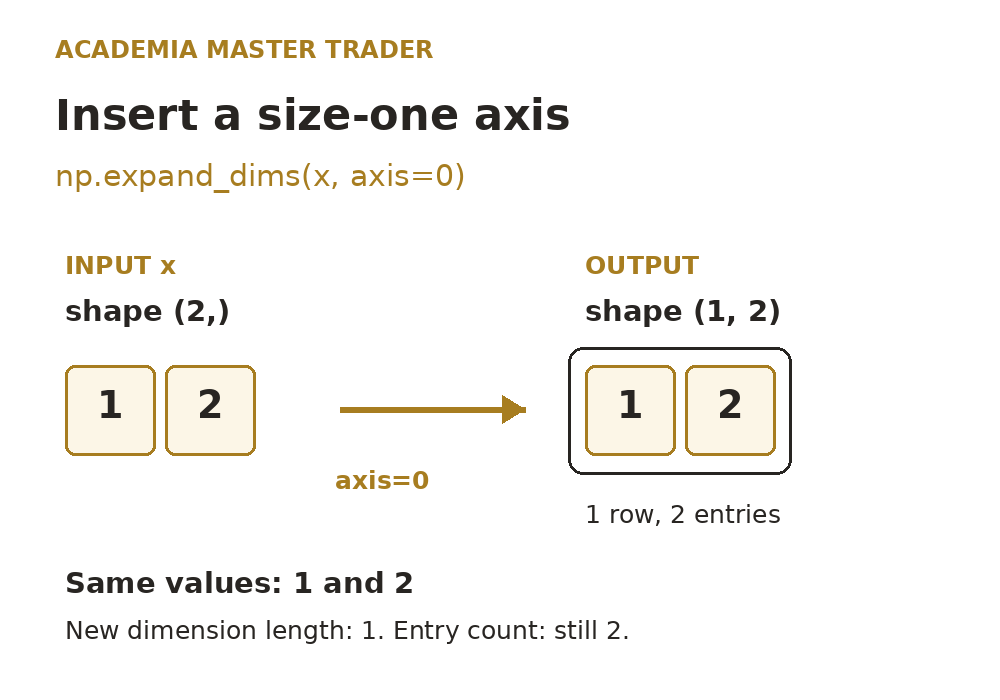
There are still two numerical entries. The new one in the shape describes the length of the added axis. It is not an extra data value inserted before one and two.
Insert the new axis after the existing axis
For the same x, np.expand_dims(x,axis=1) produces rows [1] and [2], with shape (2,1). The original length-two dimension stays first, and the new size-one dimension appears second.
The two outputs contain the same values, but one is a single row and the other is a single column. The axis argument selects where the new dimension appears, so it changes the arrangement even when the entry count stays unchanged.
Read the output shape from beginning to end. In (1,2), the first dimension has length one. In (2,1), the second dimension has length one. Writing only that the result is two-dimensional leaves this distinction unstated.
The axis names an expanded position
The documentation defines axis as a position in the expanded axes. This is important because the position belongs to the result that includes the new axis, rather than merely naming an existing input dimension.
For the one-dimensional vector, positions zero and one can each identify a place for a new axis in a two-dimensional result. They do not select an input axis to remove or replace.
Keep the operation separate from moving an existing axis. Expand_dims adds a dimension of length one. Moving axes changes the positions of dimensions that are already present. The two operations answer different structural questions.
Shape grows while entry count stays fixed
The input shape (2,), the row shape (1,2) and the column shape (2,1) each describe two entries. Multiplying the dimension lengths gives two in each case. The extra dimension does not multiply the data into additional copies.
This is why the word expand needs a precise explanation. It is the number of dimensions that increases, not the numerical values and not necessarily the number of entries.
A small example should therefore state both the shape and the contents. The contents show that one and two are retained. The shape shows where the size-one axis has been inserted.
Several new axes can be requested
The axis argument may be a tuple. For x containing [1,2], the reference shows np.expand_dims(x,axis=(0,1)), whose result has shape (1,1,2).
Two new size-one axes appear before the original length-two dimension. The result has three dimensions but still contains only the two original numerical entries.
The reference also shows axis=(2,0), giving shape (1,2,1). The new axes occupy positions zero and two of the expanded result. The original length-two axis lies between them.
Read tuple positions in the resulting shape
A tuple names positions for the inserted axes in the expanded arrangement. It should not be described as an instruction to repeatedly insert one axis and then reinterpret every subsequent position through a separate call.
For shape (1,2,1), naming the size-one axes at positions zero and two is enough to explain the structure. The remaining position holds the input's original length-two dimension.
Write the full output shape beside a multi-axis call. Nested brackets alone can be difficult to read, especially when several dimensions have length one. A shape gives a compact account of the dimension positions.
The documented result is a view
The reference describes the result as a view of the input with the number of dimensions increased. Do not describe the different bracket layout as evidence that an independent full copy of the data was created.
If later work needs an independent snapshot, that is a separate requirement from inserting an axis. A dimension change explains the arrangement used to address entries, not a guarantee that storage has become separate.
Keep those statements distinct: the output has more dimensions, the added dimensions have length one, the original values are retained and the documented result is a view. Each statement explains a different property.
Name the new dimension and its position
Continue learning with Academia Master Trader at academiamastertrader.com.br. Aprenda provides access to educational material. Read the input shape, identify the output positions for the new size-one axes and state the resulting shape. That keeps adding a dimension distinct from repeating values, changing their magnitude or moving an existing axis.