NumPy extract gathers entries selected by a condition into a one dimensional array
A condition can select individual entries from a matrix without keeping its original row and column arrangement. NumPy extract returns those selected values as a one dimensional array. Academia Master Trader explains the operation in English for readers in Armenia. Constructed examples show how a condition maps to positions, how the output order is determined and why a selected vector is not a smaller rectangular version of the original matrix.
Apply a condition to a small matrix
After import numpy as np, define m = np.array([[2,5,8],[11,14,17]]). This matrix has two rows and three columns. The comparison condition = m > 9 produces [[False,False,False],[True,True,True]]. Each Boolean entry describes whether the value at that same position is greater than nine.
The call np.extract(condition,m) returns [11,14,17]. It gathers the three values marked true and places them in a vector. The result has shape (3,), not (1,3). Although the selected values came from one row in this particular example, extract does not retain that row dimension.
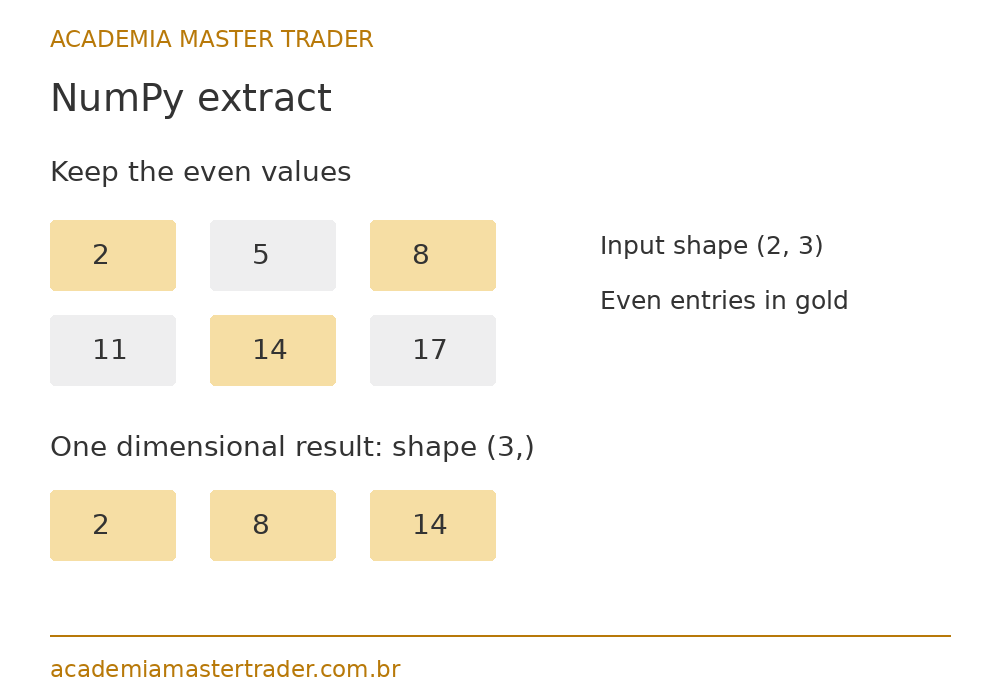
Selection can cross row boundaries
Consider condition = m % 2 == 0. The remainder calculation identifies even values, giving [[True,False,True],[False,True,False]]. The expression np.extract(condition,m) returns [2,8,14]. These selected entries come from different rows and columns, yet the output is still one dimensional.
The function follows the flattened input sequence, which here is [2,5,8,11,14,17]. It keeps the entries whose corresponding condition positions are true. The order is therefore two, eight and fourteen. It does not group entries by column or sort them as a separate operation. Any numerical ordering in this example comes from the original arrangement.
Think of values and condition being flattened together
The documented operation is equivalent to applying compress to the flattened condition and the flattened source array. For the even value example, the condition sequence is [True,False,True,False,True,False]. Applying it to the flattened values retrieves exactly the same three entries.
Use an input and condition with the same number of entries, as the interface specifies. A Boolean condition with the same shape as the input is usually easiest to read because each position aligns visibly. Write the condition from the intended rule, then inspect it beside the source instead of assuming it selects the entries you had in mind.
Numerical conditions select nonzero positions
The condition can also contain numerical entries. Nonzero entries indicate positions to retain, while zero entries indicate positions to omit. For example, np.extract([0,2,0,-1],[10,20,30,40]) returns [20,40]. The two and minus one act as selection signals; they do not multiply the retrieved values.
A Boolean condition is often clearer when explaining a filtering rule, because true and false state the choice directly. If numerical conditions are used, explain their nonzero interpretation so that readers do not mistake their magnitudes for weights. A retained entry remains the original value from its source position.
Keep the selection distinct from the source
The source matrix still contains all six original entries after extraction. The returned vector describes the subset selected by the stated condition. Its shorter length does not establish that omitted entries were invalid, unavailable or absent from the source. Those interpretations would require information beyond the selection itself.
Continue learning with Academia Master Trader at academiamastertrader.com.br and in Aprenda. Record the input shape and the rule used to build the condition. Check which positions are true and confirm the one dimensional output. This keeps array filtering clear without turning a selection rule into an unsupported conclusion about the underlying data.