NumPy flip reverses positions along selected axes while keeping the same shape
Reversing an array is a change of order, not a change of magnitude. A number can move to a different position without becoming larger or smaller. Academia Master Trader explains NumPy flip in English for readers in Sweden. Using a small matrix, we will compare reversing the row order, reversing the column order and reversing both. The aim is to connect each call with its axis and resulting positions. These are examples of data organisation, not financial outcomes.
Write down the input matrix
After import numpy as np, define a = np.array([[8,3,6],[2,9,4]]). The shape is (2,3): two rows and three columns. The first row contains eight, three and six. The second contains two, nine and four. There are six elements altogether. Before applying flip, identify these rows and columns so that the word reverse has a precise reference.
For this matrix, axis zero is the row axis and axis one is the column axis. Reversing an axis changes the order of positions on that axis. The NumPy documentation states that flip preserves the shape while reordering elements. We can therefore expect every result in this lesson to retain shape (2,3), even though the values appear in different places.
Reverse the row order
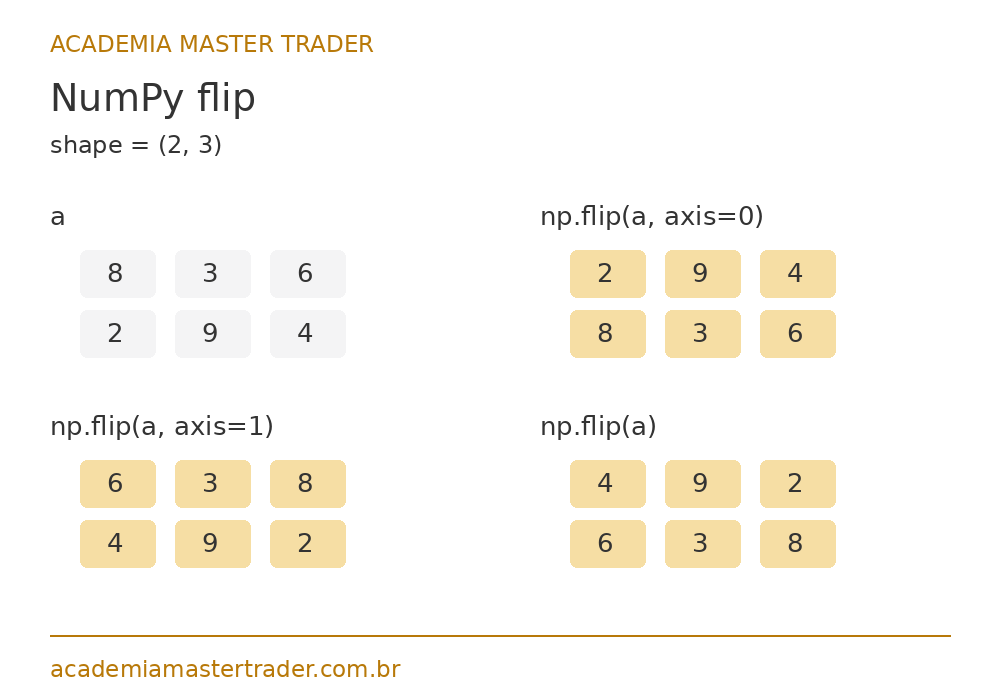
The call np.flip(a,axis=0) gives [[2,9,4],[8,3,6]]. The second row of the input comes first, followed by the original first row. The order inside each row stays the same. Two remains before nine and four, while eight remains before three and six. It is the order of rows that has been reversed.
Follow the value eight to make the movement concrete. It starts at position (0,0) and moves to (1,0). The row index changes, while the column index stays zero. The value four starts at (1,2) and moves to (0,2). Again, only the row coordinate changes. This is a position change along axis zero, not a swap between rows and columns.
Reverse the column order
The call np.flip(a,axis=1) gives [[6,3,8],[4,9,2]]. The rows remain in their original order, but the positions inside each row are reversed. Eight moves from (0,0) to (0,2), while six moves from (0,2) to (0,0). The middle value three stays in the middle of the first row.
Nine also stays in the middle of its row. An unchanged individual position does not mean that no reversal occurred. With three columns, the central column maps to itself when the column order is reversed. Read the whole arrangement and the selected axis, rather than using a single stationary element as evidence for what the operation did.
Read the three separate results
The figure shows the input matrix and three results. Each result comes directly from the same input. They are not successive steps in one chain. The axis zero panel reverses rows. The axis one panel reverses columns. The panel without an axis argument reverses both axes, because the default applies flip along all input axes.
The call np.flip(a) gives [[4,9,2],[6,3,8]]. Eight moves from the first row and first column to the second row and last column. Both coordinates are reversed within their original axis lengths. The shape still has two rows and three columns. In this two dimensional example, np.flip(a,axis=(0,1)) expresses the same choice of axes explicitly.
Keep reversal distinct from other operations
Flip does not sort the values into increasing order. In the axis zero result, the first row is two, nine and four, which is not an increasing sequence. It also does not transpose the matrix. Transposing this input would exchange the row and column axes and produce shape (3,2). All flip results here retain (2,3). These operations answer different structural questions.
The documentation describes the result as a view of the input. Do not describe flip as a guarantee of an independent copy. A reordered view and separately stored data are different concepts. If another step will change elements, consider the relationship with the original array as well as the positions shown in the printed output.
Continue learning with Academia Master Trader at academiamastertrader.com.br and in Aprenda. Begin with the input shape, name the axis and follow a few values to their new coordinates. Finally, confirm that the shape is unchanged. This keeps reversal tied to a clear rule about positions instead of a vague impression that a matrix has been turned around.