NumPy fliplr reverses column order while keeping each row together
A rectangular array can change its appearance without changing the values it contains. NumPy fliplr reverses the order along axis 1. For a two-dimensional matrix, that means the columns appear in the opposite order. Each row is read from its last entry to its first entry, while the order of the rows remains the same.
Academia Master Trader presents this lesson for English-language study in Barbados. The numbers are invented teaching values, not prices or financial results. A two-row example is enough to distinguish a left-to-right reversal from sorting, transposing or reversing a sequence through time. The key is to name the axis before describing the effect.
Give the input a clear structure
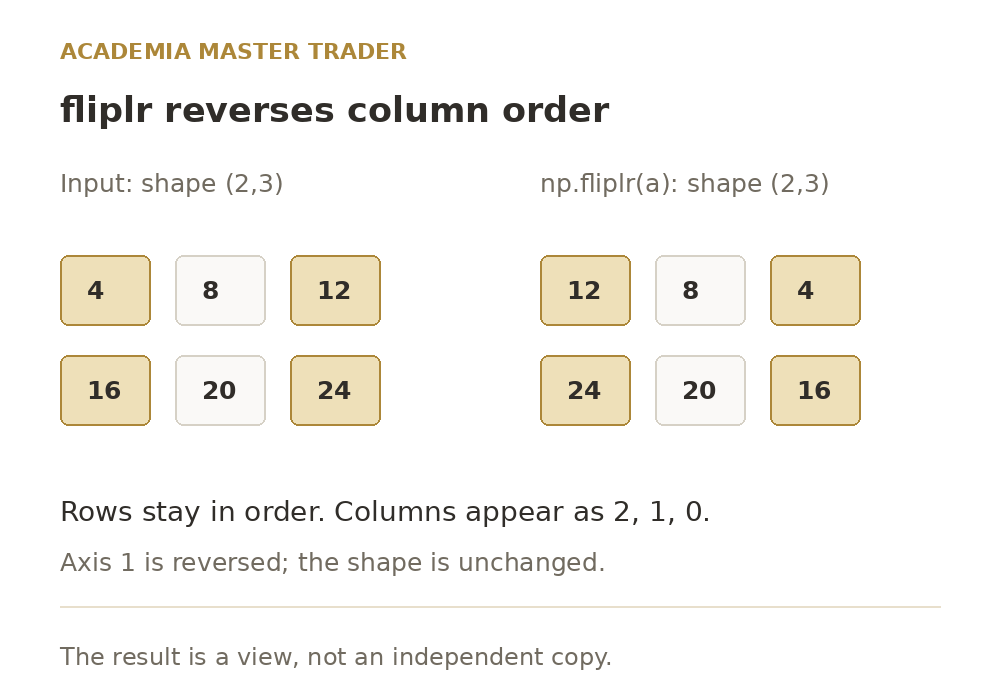
Let a have two rows: [4,8,12] and [16,20,24]. Its shape is (2,3). Axis 0 has length two and identifies the rows. Axis 1 has length three and identifies the columns. These lengths describe the arrangement, not the number of values in a particular category.
The first column contains 4 and 16. The second contains 8 and 20. The third contains 12 and 24. When fliplr reverses column order, those complete columns appear as third, second and first. The values within each column remain paired with their original row positions.
Read the reversed result row by row
The expression np.fliplr(a) produces rows [12,8,4] and [24,20,16]. The first row stays first and the second stays second. Within each row, the entry at the final column moves to the first displayed column, the middle entry stays in the middle and the original first entry appears last.
The shape remains (2,3). There are still two rows, three columns and six values. Nothing has been summed or removed. For this three-column example, the middle column remains in the middle because reversing three positions maps the central position to itself. An even number of columns would have no single central column.
Separate reversal from sorting
The first row of this example happens to start in increasing order, so its reversed form is decreasing. That is a property of the chosen values, not a sorting rule inside fliplr. If a row instead contains [8,4,12], reversing its column order gives [12,4,8]. The function follows positions rather than comparing magnitudes.
This distinction matters in written explanations. Say that axis 1 is reversed, then show the result. Saying that the function puts the largest values first would describe a different operation and would fail for the second row example. A good explanation should remain true when you replace the numbers but keep the same shape.
Keep reversal distinct from transposition
A transpose exchanges the roles of axes. A left-to-right reversal changes the order within one axis. In the example here, fliplr leaves the shape at (2,3). It does not turn two rows into three rows or turn the first row into the first column.
For a two-dimensional array, the official NumPy documentation gives the equivalent slice a[:,::-1]. The colon keeps the rows in their existing order, and the negative step reverses the column positions. The documentation also gives np.flip(a,axis=1) as an equivalent way to express the selected axis.
Understand the view before editing it
The documentation says fliplr returns a view. With a NumPy array as the input, this is different from creating an independent copy of all its values. If you name the result b=np.fliplr(a), changes through that view can affect the corresponding data in a. The changed position must be mapped through the reversed column order.
For this example, b[0,0] corresponds to a[0,2]. If a is an ordinary writable NumPy array, assigning 99 to b[0,0] also changes that entry in the shared input data. If you need a separate result before editing, b=np.fliplr(a).copy() explicitly adds a copy. Keep that distinction separate from the visual direction of the reversal.
Check the dimensional requirement
The input must have at least two dimensions. A one-dimensional array has axis 0, but it does not have axis 1. The name fliplr should therefore not be treated as a general instruction for reversing any list. Identify the shape of the object you actually have before choosing the function.
For an array with more than two dimensions, the operation still reverses axis 1. It does not automatically choose the last axis. If the shape is (2,3,4), the output has that same shape and the length-three axis is reversed. The length-four axis is not the axis selected by this function.
Keep labels aligned with the transformed data
In a study table, column labels explain what each column means. Reversing only the values while displaying the old labels unchanged would pair the values with different meanings. If the columns represent named variables, the labels need to follow the same new order in the presentation.
The same care applies to row labels. Since fliplr does not reverse axis 0, row labels remain in their original order for this two-dimensional example. Describe both decisions explicitly: columns reversed, rows preserved. That short explanation is clearer than describing the whole table as simply flipped.
Explain the result with one coordinate
A compact check is to follow the first output cell back to the input. Here the value 12 at output position [0,0] came from input position [0,2]. Once that mapping is clear, the remaining positions can be followed in the same way. The operation changes column order without making a claim about the meaning or quality of the values.
Continue your study with Academia Master Trader at academiamastertrader.com.br. Aprenda opens the educational material. Keep the original matrix beside the reversed view and name the axis whenever you explain how the positions changed.