NumPy flipud reverses row order without reversing the values inside each row
Reversing a table can mean several different things. You might reverse the columns, reverse the rows or exchange the axes. NumPy flipud has a specific meaning: it reverses axis 0. In a two-dimensional matrix, that places the last row first and the first row last. Each complete row keeps its internal column order.
This Academia Master Trader lesson is written for English-language study in the Bahamas. All numbers are invented teaching values. They are not market observations or financial results. A small rectangular matrix makes the direction of the operation visible and helps keep positional changes separate from any interpretation of the data.
Identify axis 0 in the input
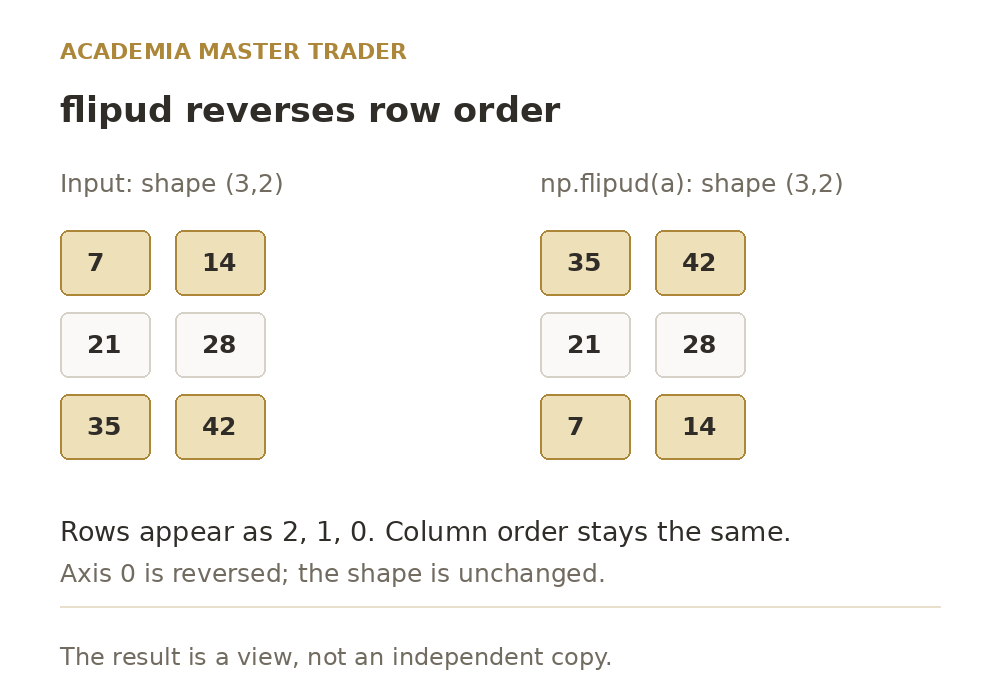
Let a contain the rows [7,14], [21,28] and [35,42]. The shape is (3,2), meaning three rows and two columns. Axis 0 has length three and identifies the row positions. Axis 1 has length two and identifies the column positions. NumPy numbers both axes and coordinates from zero.
The first row is therefore at position 0, the second at position 1 and the third at position 2. Reversing axis 0 means reading those row positions in the order 2,1,0. It does not mean reading each individual row from right to left. The selected axis tells you which order changes.
Read the result as complete rows
The expression np.flipud(a) gives rows [35,42], [21,28] and [7,14]. The original third row appears first. The middle row remains in the middle. The original first row appears last. In every case, the first value in a row remains before the second value from that same row.
The output still has shape (3,2), with six values in total. Nothing has been added, removed or summed. The middle row stays in its position because this example has an odd number of rows. With an even number of rows, there is no single central row that maps to itself under the reversal.
Keep vertical reversal distinct from horizontal reversal
A horizontal reversal would exchange the two columns in this example. It would produce rows [14,7], [28,21] and [42,35]. That is not the output of flipud. Here the rows change order while the column positions within each row remain the same.
It is useful to describe the transformation with axis numbers as well as visual directions. Up and down make sense in a matrix drawing, but axis 0 identifies the operation precisely. The NumPy documentation gives np.flip(a,axis=0) as an equivalent expression. It also gives the slice a[::-1,...], which reverses the first axis and retains the others.
Follow one coordinate through the operation
In the input, the value 35 occupies a[2,0]. After reversal, it appears at output position [0,0]. The row coordinate changes from 2 to 0, while the column coordinate remains 0. Similarly, the input value 14 at [0,1] appears at output position [2,1].
For this three-row example, an output row i comes from input row 2 minus i. More generally, if axis 0 has length n, the corresponding input position is n minus 1 minus i. This positional mapping explains the result independently of the numerical values stored in the array.
Do not confuse reversal with a sort
The example starts with rows whose numbers increase from top to bottom. Reversing the rows therefore makes the displayed first-column values decrease. That does not mean flipud sorts the matrix. If the first-column values were 21,7 and 35, the reversed order would be 35,7 and 21.
The function follows the original positions from the end of axis 0 to the beginning. It does not compare values or choose which row deserves to come first. An explanation based on magnitude would fail as soon as the numbers changed, while an explanation based on axis 0 would remain correct.
Recognise that the result is a view
The official documentation describes flipud as returning a view. With a NumPy array input, the reversed view refers to the same underlying data rather than providing an independent copy of every value. If b=np.flipud(a), edits through b can therefore affect the corresponding entries in a.
For the ordinary writable NumPy array in this example, b[0,0] refers to the value originally at a[2,0]. Assigning 99 through that output position also changes the corresponding input data. If your next step requires an independent editable result, b=np.flipud(a).copy() explicitly adds a copy after the reversal.
Read one-dimensional and larger arrays by their axes
Unlike a function that specifically requires axis 1, flipud can work with a one-dimensional input. The documented requirement is at least one dimension. For a one-dimensional array [7,14,21], reversing axis 0 produces [21,14,7]. A scalar has no axis 0 and is outside that dimensional requirement.
For an array with shape (2,3,4), flipud still reverses axis 0. The two blocks along that first axis exchange order. The length-three and length-four axes keep their internal order. The name should not be read as a command to search for a visual vertical direction inside every matrix slice.
Keep the row labels with the rows
If rows carry labels, those labels explain what each row means. A presentation that reverses the data rows but keeps the labels in their old positions would attach the wrong labels to the values. The row labels must follow the same reversed order when they describe those rows.
Column labels do not need a reversed order for this two-dimensional operation, because axis 1 has not changed. State both parts together: rows reversed, columns preserved. That wording describes the example more clearly than saying that the table has simply been turned around.
Continue your study with Academia Master Trader at academiamastertrader.com.br. Aprenda opens the educational material. Keep the original matrix beside its reversed view, name axis 0 and follow one complete row at a time.