NumPy full creates an array with a chosen shape and a value supplied in advance
An array does not always begin with a collection of different observations. Sometimes the task is to create a structure of a known size and fill its positions with a chosen value. NumPy full does that directly. Its first argument describes the shape, and its second supplies the value used to fill the new array.
Academia Master Trader presents this lesson in English for readers in Malta. The numbers are invented examples of array structure. They are not market prices, trading signals or financial results. The aim is to make the relationship between dimensions, stored values and data type clear before the array enters another calculation.
Shape and fill value have separate jobs
Consider np.full((2,3),7). The shape is (2,3), so the output has two rows and three columns. Both rows contain [7,7,7]. There are six positions altogether, and every position contains the supplied value seven. The number seven does not describe the number of rows or columns.
Conversely, the numbers two and three do not become the stored values. They define the structure that receives those values. Keeping these roles separate makes the call easier to read: first describe the container, then state what should occupy it. A chosen fill value does not add an extra axis.
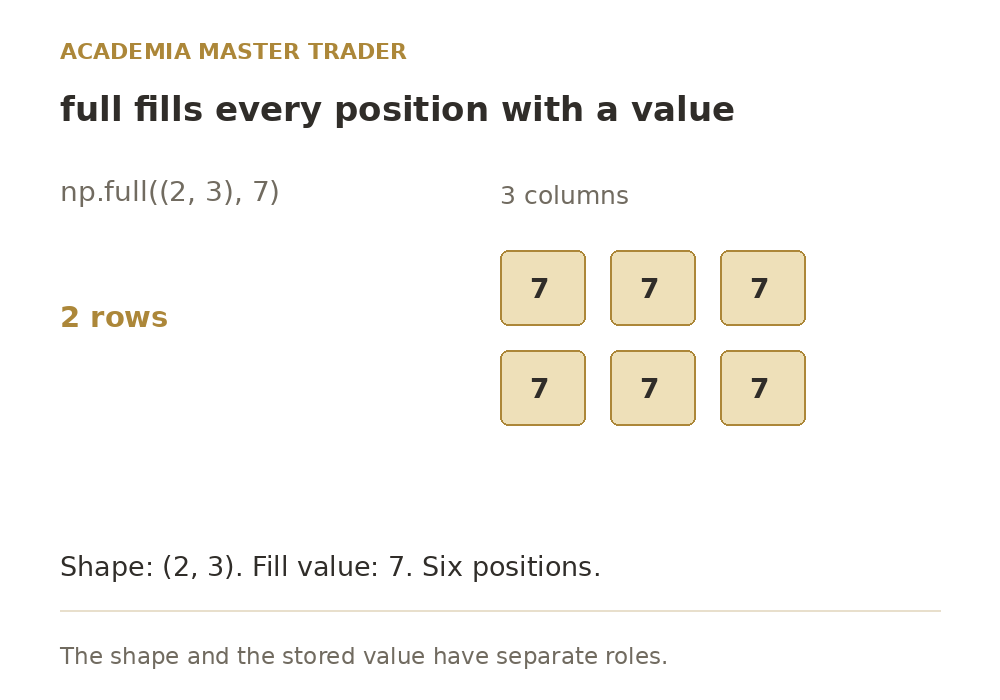
The result is a new array. It is not a request to change an existing array in place, and it does not calculate a running total from earlier observations. All six entries in this example come from the construction rule. Their repetition says nothing about how many independent observations have been collected.
One dimension is different from two
The shape argument can also be an integer. With np.full(4,7), the result is the one-dimensional sequence [7,7,7,7], with shape (4,). There is one axis of length four. This differs from np.full((1,4),7), which creates a two-dimensional array containing one row and four columns.
Those two outputs contain the same number of elements, but their shapes are different. A later operation that expects rows and columns may therefore treat them differently. Count the axes as well as the elements. Four stored numbers do not by themselves tell you whether the array has one dimension or two.
A shape of (4,1) describes another arrangement: four rows and one column. Each row contains a single seven. The shape is not interchangeable with (1,4), even though both describe four positions. Reading the dimensions in their stated order is part of understanding the construction.
The fill value also informs the default type
When dtype is not supplied, the documentation defines the default type through np.array(fill_value).dtype. The fill value therefore matters for more than the numbers displayed. An integer fill value and a value written in floating-point form can lead to different array data types.
For a clear explicit choice, np.full((2,3),7,dtype=float) creates the same two-by-three arrangement with floating-point values. They may be displayed as 7. rather than 7. That display does not change the shape or add information about measurement accuracy. It reflects the numerical representation selected for the array.
Choose the type according to the operations that will follow. Do not assume that changing dtype changes the number of rows, and do not assume that the appearance of a decimal point means the values came from a measured series. Shape, value and type answer separate questions.
A fill value can contain more than one element
The documented fill_value parameter accepts a scalar or an array-like value. The official example np.full((2,2),[1,2]) produces the rows [1,2] and [1,2]. The two-element input is used across the rows in that example. The output still has the shape given by the first argument.
This does not mean that an arbitrary sequence can fill every requested shape. The relationship between the supplied values and the target shape must be compatible. For an introductory example, use a scalar when every position should contain the same number. Use a small explicit pattern only after checking how it fits the requested dimensions.
Memory order is not a different visible pattern
The order argument concerns how multidimensional data is stored in memory. The documentation offers C or Fortran order. This is separate from the chosen values and the visible arrangement of rows and columns. Changing the storage order is not a way to replace seven with another number or exchange the two dimensions.
Before constructing the array, write down the expected shape and one expected row. Afterwards, compare those with the output. For the main example, the description is two rows, three columns and seven in every position. That short statement keeps the construction clear without treating repeated entries as separate source data.
Continue learning with Academia Master Trader at academiamastertrader.com.br. Aprenda gives access to educational material. Start with the required dimensions, choose the fill value and then decide whether the type needs to be explicit. These separate steps make a newly created array easier to understand and reuse.