NumPy geomspace builds a geometric sequence using endpoint values and a sample count
Some numerical sequences advance by multiplication rather than by adding the same amount. NumPy geomspace creates samples that are evenly spaced on a logarithmic scale. In a straightforward positive example, each value is a constant multiple of the preceding value. The endpoint values and the requested sample count determine the progression.
Academia Master Trader presents this explanation in English for readers in Rwanda. The examples concern numerical arrays only. They are not prices, trading signals or financial results. The aim is to distinguish a constant ratio from a constant difference and to explain what the function's endpoints actually represent.
Read a small progression first
The expression np.geomspace(1,1000,num=4) produces the displayed values [1.,10.,100.,1000.]. The start is one, the stop is one thousand and there are four samples. Both endpoint values are included under the default endpoint setting.
The ratio between successive values is ten: one multiplied by ten gives ten, then one hundred, then one thousand. The differences are nine, ninety and nine hundred. They are not equal, even though the ratios are.
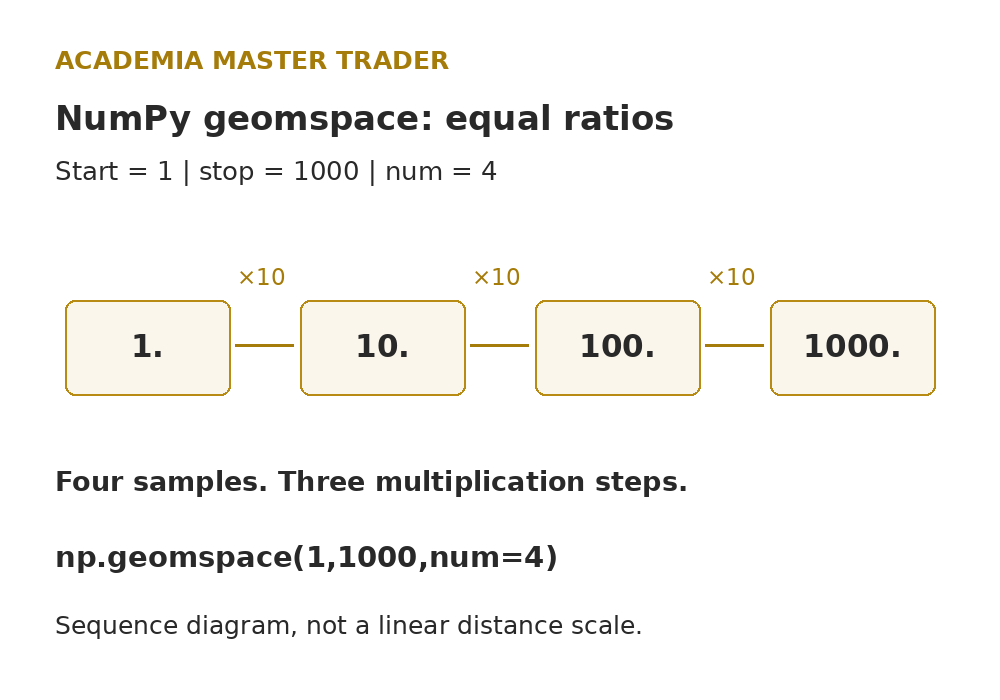
The diagram is a sequence of labelled values, not a linear distance scale. Equal space between the boxes helps display the order of the samples. It should not be read as a claim that the arithmetic differences between those numbers are equal.
Sample count and multiplication steps are different
Four samples contain three transitions between neighbouring values. In the opening example, multiplying by ten three times takes the start from one to one thousand. The count of samples is therefore one greater than the count of transitions when both endpoints are present.
The argument num requests values, not a multiplier. A num value of four does not ask the function to multiply each sample by four. The common ratio follows from the endpoint relationship and the number of transitions.
Explain the role of each argument before interpreting a long sequence. Start and stop name endpoint values. Num names the number of samples. The ratio is a consequence of those choices, not an additional positional argument in this call.
The endpoints are supplied directly
Geomspace takes the actual start and stop values. In the opening example, one and one thousand are the boundaries themselves. They are not exponents that must first be raised using a separately chosen base.
This makes the interface different from logspace, whose endpoints are specified through logarithms and a base. A short explanation should identify which constructor it uses instead of treating every logarithmically spaced sequence as the same calling convention.
The name of the function alone is not enough to decode an expression copied without its arguments. Reading the start, stop and sample count together gives a concrete account of the requested progression.
Excluding the endpoint changes the ratio
The default endpoint setting is True. The expression np.geomspace(1,1000,num=3,endpoint=False) instead returns the displayed values [1.,10.,100.]. It produces three samples while leaving the stop value one thousand outside the returned sequence.
Endpoint False does not simply remove the last item from an ordinary three-sample result and leave two entries behind. The function still returns the requested number of samples. Its logarithmic spacing is determined with the excluded endpoint in mind.
Compare requests using both their count and their endpoint policy. The same boundaries with a different count or a different endpoint setting can give a different common ratio. A boundary label should therefore travel with those conditions whenever an example is summarised.
Floating-point output needs precise wording
When dtype is omitted, the official reference states that the inferred output type is never an integer. Float is chosen even when the endpoint arguments could describe an integer-looking sequence. The printed decimal points in the opening example are consistent with that representation.
Displayed values that look like whole numbers are not a general guarantee of exact integer computation. The reference specifically notes that a geometric progression may not produce exact integers. Converting its floating-point values directly to an integer type can therefore give entries different from the intended rounded values.
State the intended conversion rule when integer output is required. Do not present dtype as a harmless display switch that merely removes decimal punctuation. Representation and rounding are part of the numerical explanation, separate from the ideal geometric pattern.
Direction follows the endpoints
A geometric sequence can also decrease. The reference shows a progression from one thousand to one with four samples, displayed as [1000.,100.,10.,1.]. Each value is one tenth of the preceding value.
Equal ratios do not require the sequence to grow. They require a consistent multiplicative relationship between neighbouring samples. This lesson stays with positive real endpoints so that the ratio can be read directly without introducing complex-valued paths.
Explain ratio before appearance
Continue learning with Academia Master Trader at academiamastertrader.com.br. Aprenda provides access to educational material. Name the endpoint values, sample count and endpoint policy, then compare neighbouring ratios rather than neighbouring differences. That gives a clear account of the geometric progression without mistaking a neat diagram for a linear measurement scale.