NumPy logspace uses exponents to define a sequence that is evenly spaced on a logarithmic scale
A logarithmically spaced sequence can be described through a base and a range of exponents. NumPy logspace uses that approach. Its start and stop arguments describe exponents, while the base determines how those exponents become output values. Reading those roles correctly prevents the endpoint arguments from being mistaken for the output boundaries themselves.
Academia Master Trader presents this explanation in English for readers in South Sudan. The examples concern numerical arrays only. They are not prices, trading signals or financial results. The aim is to separate exponent values, generated values and sample count before interpreting the pattern in the result.
Begin with an explicit base
The expression np.logspace(0,3,num=4,base=10) produces the displayed values [1.,10.,100.,1000.]. The exponents are zero, one, two and three. Raising ten to those powers gives the four output values.
The first output is one, not zero. The last output is one thousand, not three. Zero and three describe the exponent interval in this call. They are not the numerical bounds of the returned sequence in ordinary linear space.
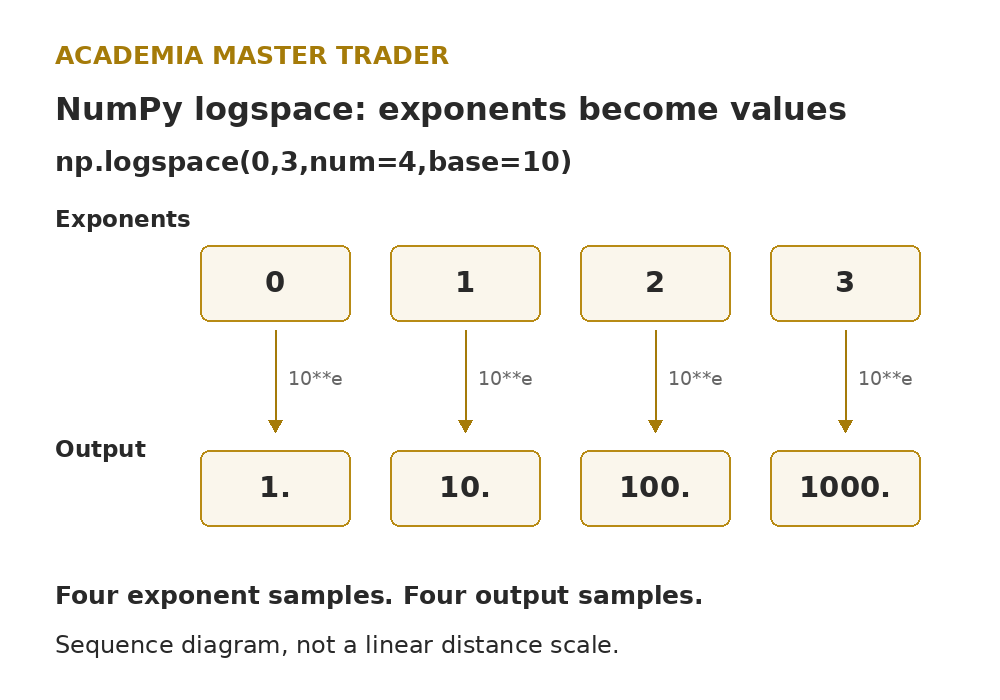
This two-row diagram keeps the exponent sequence separate from the output sequence. Both have four positions, but they contain different numbers. The mapping between them is the power operation with the chosen base.
Equal exponent spacing creates equal output ratios
The exponents in the opening example increase by one each time. The corresponding output values are multiplied by ten each time. Equal additive steps in exponent space therefore produce equal multiplicative ratios in the generated values.
The differences between the output values are nine, ninety and nine hundred. Those differences are not constant. Describing the output as evenly spaced requires naming the logarithmic scale, rather than implying equal arithmetic differences in ordinary linear space.
The figure is a labelled sequence, not a linear distance scale. Equal spacing between its boxes shows order and correspondence. It does not claim that one, ten, one hundred and one thousand are separated by equal arithmetic distances.
The sample count is not the exponent step
The argument num specifies the number of samples. In the opening expression, num equals four, so four values are returned. It does not request an exponent step of four or a multiplier of four between output values.
With both endpoints included, four samples divide the exponent interval from zero to three into three equal gaps. Those gaps happen to have length one in this example. Other sample counts can give fractional exponent gaps and output values that are not whole-number-looking powers.
The official reference lists fifty as the default sample count. For an introductory explanation, supplying num explicitly makes the requested size visible and keeps the output short enough to inspect entry by entry.
The default base is ten
The reference lists 10.0 as the default base. Writing base explicitly in the example makes the transformation easy to read, even though ten is already the default. A different base changes the output while leaving the exponent arguments' roles intact.
For example, np.logspace(0,3,num=4,base=2) produces the displayed values [1.,2.,4.,8.]. The exponents are still zero, one, two and three. The output changes because those exponents are now applied to two rather than ten.
Do not describe base as another endpoint. It controls the power transformation used to convert exponent samples into output values. Start, stop, num and base each answer a different question about the request.
Endpoint policy applies to the exponent interval
Endpoint is True by default. In the opening example, the final exponent three is included, so the final output is ten raised to three. When endpoint is False, the excluded exponent boundary still determines the spacing of the requested samples.
The expression np.logspace(0,4,num=4,base=10,endpoint=False) gives the displayed values [1.,10.,100.,1000.]. The exponent samples are zero, one, two and three; the exponent boundary four is excluded. The corresponding boundary value ten thousand is not returned.
The number of samples remains four. Endpoint False is not simply an instruction to create four ordinary samples and remove one. It changes the exponent spacing while preserving the requested sample count.
Numerical representation is a separate property
When dtype is omitted, the reference states that the inferred output type is never an integer. Float is chosen even when the arguments would produce an integer-looking array. Decimal points in the opening example reflect that floating-point representation.
A clean mathematical progression and its numerical representation are related but separate descriptions. Do not infer an integer type solely because displayed values look like whole numbers. State an explicit representation requirement when a later calculation depends on it.
This lesson uses a scalar positive base and simple scalar exponent boundaries. More elaborate array-valued arguments need their own explanation of output axes. Keeping the first example small makes the central exponent-to-value relationship clear.
Read powers before reading endpoints
Continue learning with Academia Master Trader at academiamastertrader.com.br. Aprenda provides access to educational material. Name the base, exponent interval, sample count and endpoint policy. Then translate the exponent samples into output values. This prevents an exponent boundary from being mistaken for the numerical endpoint of the returned array.