NumPy pad adds a defined border while keeping the original array entries together
Adding positions around an array is different from repeating its whole pattern or changing the arrangement of its existing entries. NumPy pad creates a padded array whose border follows a chosen rule. In constant mode, the added positions contain a specified constant, while the original entries remain together inside that border.
Academia Master Trader presents this lesson for English-language study in Saint Lucia. All numbers are invented teaching values, not prices, trading signals or financial results. The aim is to explain three separate choices: how many positions to add, which sides receive them and what values the added positions contain.
Read the width before choosing the value
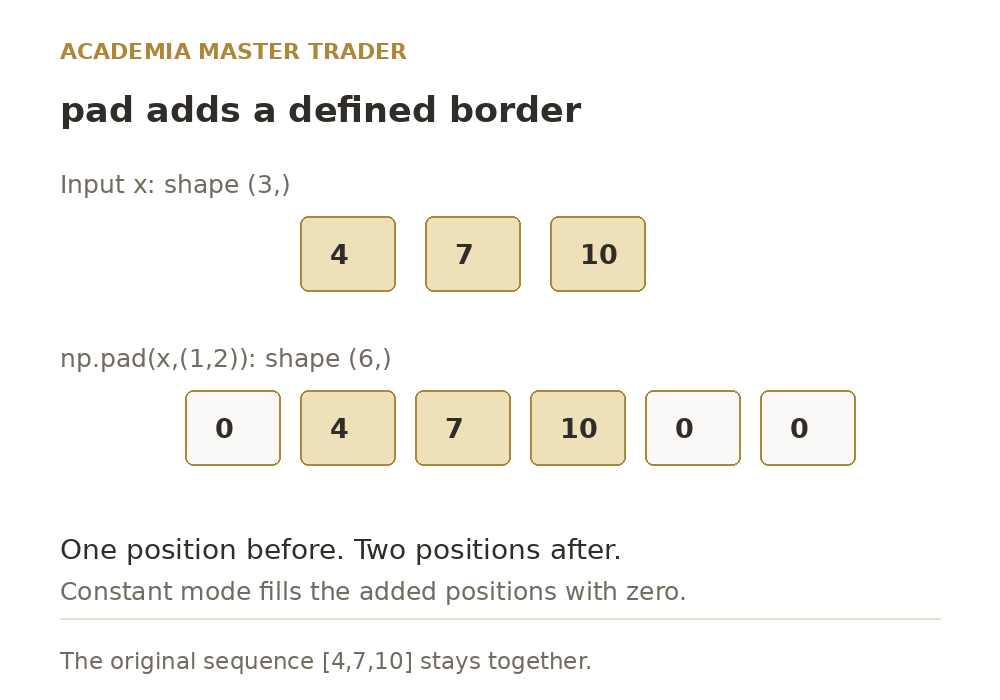
Let x be [4,7,10]. The expression np.pad(x,(1,2),mode='constant') adds one position before the sequence and two positions after it. With the default constant value of zero, the output is [0,4,7,10,0,0]. Its length is six: three original positions plus three added positions.
The pair (1,2) describes widths, not the values written into the border. It does not place the number 1 before the array and the number 2 after it. Keeping the width separate from the border value makes the expression easier to explain and the output easier to check.
Recognise the constant mode explicitly
Constant is the default padding mode, and its default added value is zero. Writing mode='constant' in a lesson makes the intended rule visible even when the default would produce the same output. The widths determine how many positions are added; the mode determines how their values are supplied.
Other modes use other rules. Edge mode repeats boundary values, while wrap mode takes values from the opposite end of the array. A matching output shape does not mean that two modes produce matching contents. Name the mode alongside the widths whenever the border values matter to the explanation.
Choose a different border constant deliberately
Constant mode can use a value other than zero. In np.pad(x,(1,2),mode='constant',constant_values=9), the same three added positions contain 9. The output is [9,4,7,10,9,9]. The original sequence stays 4,7,10, and the output length stays six.
The parameter name constant_values contains an underscore. Read it as the setting for the values used in the constant border, not as a separate width. Changing that setting alone does not change the number of positions added. The border's content and its dimensions remain separate parts of the call.
Give each matrix axis its own width pair
Let a contain rows [2,5] and [8,11], with shape (2,2). For a matrix, axis 0 describes the row direction and axis 1 the column direction. The nested widths ((1,0),(0,1)) request one row before and none after along axis 0, then no columns before and one column after along axis 1.
With constant zero padding, np.pad(a,((1,0),(0,1)),mode='constant') produces rows [0,0,0], [2,5,0] and [8,11,0]. Its shape is (3,3). The original two-by-two block sits below the added top row and before the added final column. Its internal ordering has not changed.
Calculate the output shape from both sides
For each axis, add the original length, the width before and the width after. In the matrix example, the row length becomes 2+1+0=3 and the column length becomes 2+0+1=3. Calculating those lengths before writing the output gives a useful independent check on the arrangement.
A zero width means that no positions are added on that side. It does not create a border filled with zeros there. In the example, the final column contains zeros because constant mode fills an added column with its default value, not because one of the width settings happens to be zero.
Keep original entries distinct from supplied entries
If an array represents observations, padding does not create new observations. The border entries are supplied by a construction rule. A zero in that border can mean a chosen placeholder rather than a measured zero. Preserve that difference when labelling an output table or describing what its values represent.
The same care applies when a border constant happens to equal a value already inside the array. Equal numbers do not establish equal origins. A small diagram that marks the original region can show which entries came from the input and which were supplied by the padding rule.
Explain the complete border decision
A clear description names the input shape, each before-and-after width, the mode and any chosen constant. Then it identifies where the original block appears in the output. These details explain both the new shape and the meaning of its border without treating added positions as additional recorded data.
Continue learning with Academia Master Trader at academiamastertrader.com.br. Aprenda opens the educational material. Start with one side of one axis, count the positions added there and follow the chosen filling rule. Repeat that reading for the remaining sides before interpreting the completed array.