NumPy repeat duplicates entries or slices along a chosen axis rather than repeating an entire pattern
Repeating each entry is different from writing a whole sequence again. The distinction matters when an array grows and the position of each copy needs to stay clear. Academia Master Trader explains NumPy repeat in English for readers in Serbia. We will begin with a short sequence, then repeat rows and columns of a matrix. The extra entries are copies of supplied values. They are not new observations, additional measurements or evidence of financial performance.
Repeat each sequence entry consecutively
After import numpy as np, define x = np.array([8,3,6]). The call np.repeat(x,2) returns [8,8,3,3,6,6]. Each original entry appears twice before the operation moves to the next original entry. The input has shape (3,), and this output has shape (6,). A repetition count of two means two total appearances, not the original plus two additional copies.
The result is not [8,3,6,8,3,6]. That arrangement repeats the entire three entry pattern. NumPy repeat instead keeps each entry's repetitions adjacent. Follow the first value eight: its two output positions are zero and one. Three then occupies two and three, while six occupies four and five. This positional account identifies the operation more clearly than the shared output length alone.
Give different counts to different entries
The call np.repeat(x,[1,2,3]) returns [8,3,3,6,6,6]. Eight appears once, three twice and six three times. The counts describe each original position in order. The output length is the sum of those counts, so it is six in this example. The repeated groups preserve the order of the original entries.
A zero count contributes no copy of that entry. For example, np.repeat(x,[1,0,2]) returns [8,6,6]. Three is omitted because its specified count is zero, not because of its numerical size or a comparison with neighbouring values. Use compatible counts for the chosen input or axis. Naming the counts and their positions prevents a reader from interpreting them as new values to insert.
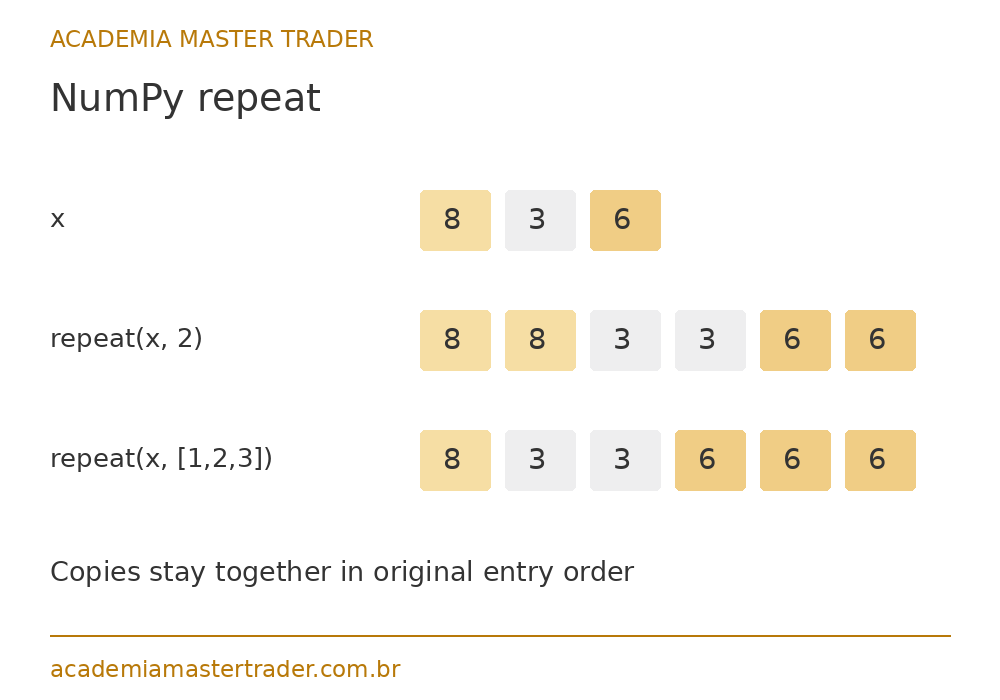
Read the figure as groups of copies
The figure shows the original sequence above the two repetition results. Matching colours connect each original entry with its output group. In the equal count result, every colour occupies two adjacent cells. In the unequal count result, the coloured groups have lengths one, two and three. Read group lengths rather than treating repeated numbers as independent measurements.
Both illustrated outputs have six entries, but they use different repetition rules. Equal output length does not establish equal content or equal grouping. The first output contains two eights; the second contains one eight. Keeping the repetition counts next to the output makes that distinction visible. The copied values retain their original numerical meaning even though their number of appearances changes.
Repeat complete rows or columns
Define a = np.array([[8,3],[2,9]]), with shape (2,2). The call np.repeat(a,2,axis=0) returns [[8,3],[8,3],[2,9],[2,9]], with shape (4,2). Axis zero selects rows as the slices being repeated. The first complete row appears twice, followed by two appearances of the second complete row. The column count remains two.
The call np.repeat(a,2,axis=1) returns [[8,8,3,3],[2,2,9,9]], with shape (2,4). Now columns are repeated, so each row contains adjacent pairs. The number of rows remains two. Because the input is square, its original shape does not identify which direction will grow. The axis argument and the resulting shape show which dimension changed.
State the default flattening rule
If axis is omitted, NumPy uses the flattened input and returns a flat output. For our matrix, np.repeat(a,2) returns [8,8,3,3,2,2,9,9], with shape (8,). It does not preserve the two dimensional layout. That differs from explicitly repeating along either matrix axis, even though all three calls copy the same supplied values.
Continue learning with Academia Master Trader at academiamastertrader.com.br and in Aprenda. Record the input shape, repetition counts and axis before writing the result. Then follow one original entry or complete slice through its output group. These checks distinguish consecutive repetition from pattern repetition and keep copied data separate from genuinely new observations.