NumPy repeat expands entries by their repetition counts rather than multiplying values
Repeating an entry changes how many times it appears. It does not multiply the numerical value stored there. NumPy repeat makes that distinction explicit: the repeats argument sets the number of appearances, while axis identifies the direction in which the array expands. When axis is omitted, the input is flattened and the result is one-dimensional.
Academia Master Trader presents this lesson for English-language study in Antigua and Barbuda. The numbers are invented teaching values, not prices, transaction counts or financial results. Short examples show how repetition changes the arrangement and size of an array, while leaving the repeated values themselves unchanged.
Read a uniform repetition count
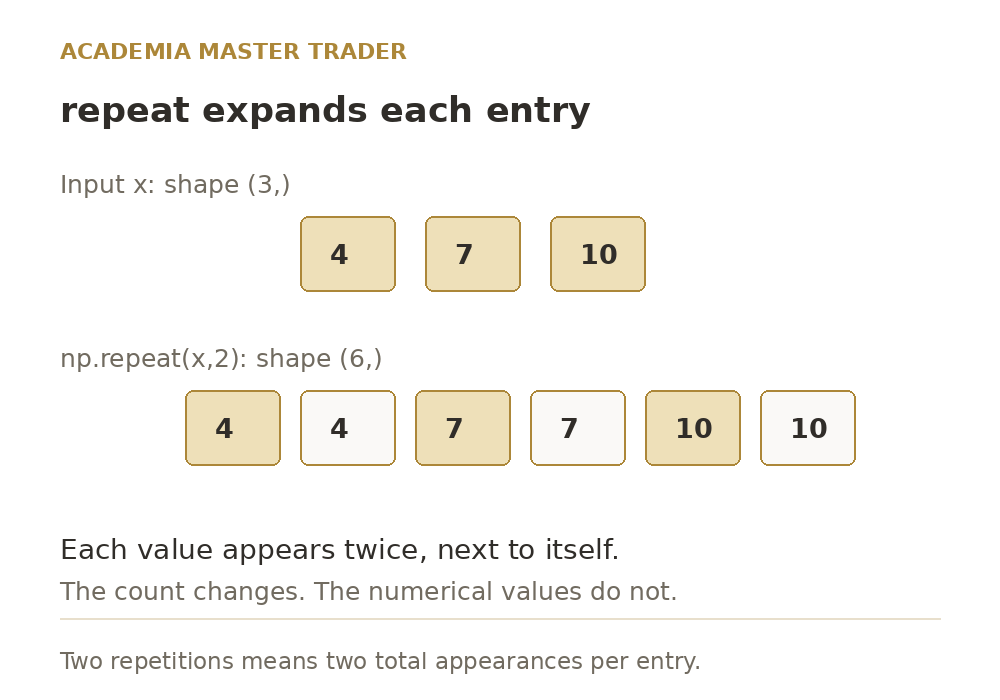
Let x be [4,7,10]. The expression np.repeat(x,2) produces [4,4,7,7,10,10]. Each original entry appears twice, next to itself. The input has three positions, while the output has six. The value 4 remains 4 in both of its output positions; it does not become 8.
The count two means two total appearances for each entry, not the original appearance plus two additional copies. This detail is worth stating before drawing the result. If the count is three, each entry appears three times. The repeats argument describes the total number of repetitions in the output.
Keep each repeated group together
The sequence [4,4,7,7,10,10] contains a group for each original entry in its original order. It is not the sequence [4,7,10,4,7,10]. Repeating individual entries and repeating the whole input as a block describe different arrangements, even though both examples contain six values.
This distinction makes a handwritten output easier to check. Start at the first input position, write it the requested number of times, then move to the next input position. Do not return to the beginning of the input after writing only one appearance of each value.
Give different entries different counts
The repeats argument can also supply a count for each position. For x=[4,7,10], np.repeat(x,[1,3,2]) produces [4,7,7,7,10,10]. The first entry appears once, the second three times and the third twice. The output length is six because those counts sum to six.
The counts belong to positions, not to unique numerical values. If two input positions happen to contain the same number, each position still has its own repetition count. Keeping a small table of input positions and counts avoids treating repeat as a rule for all occurrences of a particular number.
Specify axis 1 to expand columns
Let a contain rows [2,5] and [8,11], with shape (2,2). The expression np.repeat(a,2,axis=1) gives rows [2,2,5,5] and [8,8,11,11]. Axis 1 is the column axis, so its length expands from two to four while the number of rows stays two.
You can also read this as repeating complete columns. The first input column, containing 2 and 8, appears twice. The second, containing 5 and 11, appears twice. The column groups remain in their original order. Naming the output shape (2,4) makes the structural change clear.
Specify axis 0 to expand rows
For the same input, np.repeat(a,2,axis=0) gives rows [2,5], [2,5], [8,11] and [8,11]. Complete rows are repeated. The output shape is (4,2): four rows and two columns. This is different from repeating the entries inside each row along axis 1.
With different counts, np.repeat(a,[1,2],axis=0) gives rows [2,5], [8,11] and [8,11]. The first row appears once and the second twice. Its shape is (3,2). The order of the counts follows the order of positions along the selected axis.
Recognise the flattened default
The default axis is None. The documentation says repeat uses the flattened input and returns a flat output. For the same two-dimensional input, np.repeat(a,2) produces the one-dimensional sequence [2,2,5,5,8,8,11,11]. Its shape is (8,), not (2,4) or (4,2).
All three calls produce eight values when every entry is repeated twice, but their shapes and arrangements differ. A count of values is therefore not enough to describe the result. Include axis and output shape whenever you explain repetition on a matrix.
Keep count alignment explicit
The documentation states that the repetition counts are broadcast to fit the selected axis. A single count can apply uniformly, as in the examples with repeats=2. A list of counts can assign different repetitions to positions, as in the example with two row counts.
Before using position-specific counts, identify the length of the selected axis and how the counts align with it. For the simple row example, two counts describe two input rows. This makes the relationship visible without assuming that any arbitrary count list will match any input shape.
Separate repeated entries from new observations
If an array represents recorded observations, repeating its entries does not create additional independently observed information. It creates additional positions containing selected existing values. The output can be useful as an arrangement, but the meaning of a repetition should be stated separately from its numerical appearance.
The same care applies to labels. If rows or columns carry names, an expanded presentation needs labels that follow the repeated positions. Leaving the old labels beside a larger output can hide which entries came from which input position. Preserve that connection when explaining the result.
Explain the expansion before continuing
A clear description names the input, the repetition counts, the selected axis and the output shape. For the first example, each of three values appears twice in a one-dimensional output. For the matrix examples, axis 1 expands columns, axis 0 expands rows and axis=None returns a flattened sequence.
Continue learning with Academia Master Trader at academiamastertrader.com.br. Aprenda opens the educational material. Follow one input position and its repetition count at a time, then check the complete output arrangement before interpreting the values.