NumPy resize fills a new shape by cycling through array entries rather than interpolating values
Changing an array's shape and changing its total number of entries are different operations. NumPy resize can return an array with a different total size. When the requested output needs more entries than the input contains, it cycles through the input again. The extra positions contain repeated existing values, not values calculated between neighbouring entries.
Academia Master Trader presents this lesson for English-language study in Grenada. The examples use invented numbers to explain array arrangement. They are not prices, trading signals or financial results. The central question is where each output position gets its value, especially when the output contains more positions than the original input.
Start with the input reading order
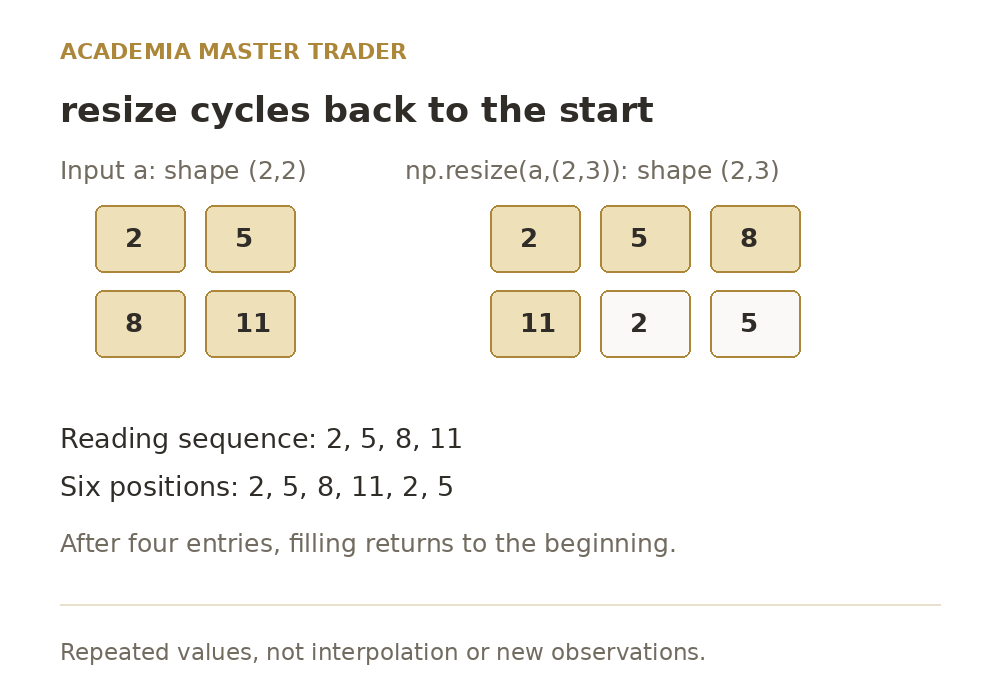
Let a have two rows, [2,5] and [8,11]. Its shape is (2,2), so it contains four entries. For np.resize, read this input in C-order: the last axis changes fastest. In this simple matrix, that means reading across the first row and then across the second row. The resulting sequence is 2,5,8,11.
Keep that sequence beside the requested output shape. The function fills output positions in that same order. It does not preserve the original row boundaries as independent units. A new row can therefore begin in the middle of the input sequence, depending on how many columns the output has.
Fill a larger output one position at a time
The expression np.resize(a,(2,3)) requests two rows and three columns, for six entries altogether. Reading the input gives only four entries. The function uses 2,5,8,11, then returns to the beginning and uses 2,5 again. Arranged into the requested shape, the output rows are [2,5,8] and [11,2,5].
Notice the boundary after the first three output entries. The original input row [2,5] has not been stretched into three smoothly changing values. Instead, the first entry from the second input row, 8, completes the first output row. The next output row starts with 11 before the cycle returns to 2.
Separate a new shape from new information
The six-position output contains two additional positions, but it contains no newly observed values. The values 2 and 5 appear again because the filling procedure returned to the start of the input. Their repeated appearance is a consequence of array construction, not evidence of additional measurements.
This distinction matters whenever a table represents observations rather than an abstract pattern. State why repeated entries exist. A larger array can be convenient for illustrating a layout, but its shape alone does not explain whether the entries were observed, calculated, copied or supplied as placeholders.
Read a smaller output as a shorter sequence
The expression np.resize(a,(1,3)) requests three entries. The output is one row, [2,5,8]. The value 11 is not needed to fill the requested positions. Reducing the output size does not summarise the four original values, preserve every row or calculate an average. It fills the smaller output from the start of the same reading sequence.
If the goal is to select particular rows or columns, describe that selection directly with indexing. A shorter output from resize follows its filling rule; it is not a statement that the omitted positions were unimportant. Name the intended data operation before choosing a function with a convenient output shape.
Use reshape when the total size stays the same
For the same four input entries, a shape such as (1,4) does not require extra positions or discard any entries. NumPy's documentation directs readers to reshape when the total size does not change. That choice makes the purpose clearer: rearranging the shape while keeping the number of entries fixed.
For a larger output, first decide how new positions should be filled. Repeating the input cycle, adding a chosen border value and estimating intermediate values are different aims. NumPy resize has one particular filling rule. Choosing it because its name resembles a general resizing operation can hide that rule from a reader.
Distinguish the function from the array method
The function call np.resize(a,newshape) returns a new array. It is different from the ndarray method a.resize(newshape), which changes an array in place when its conditions allow that change. The two forms also differ when enlarging: the method fills additional positions with zeros rather than cycling through the original values.
Read the complete expression, including whether resize follows np or follows an array variable. That small difference in notation changes the operation. In written explanations, name the function explicitly and show the input and output rather than relying on the word resize by itself.
Keep axis meanings in view
NumPy resize does not treat each axis as a separate entity and does not perform interpolation or extrapolation. Its cycling sequence can cross original row boundaries. The documentation therefore says it is not suitable for resizing images or data whose axes represent separate, distinct entities.
Continue learning with Academia Master Trader at academiamastertrader.com.br. Aprenda opens the educational material. Write the input reading sequence, count the requested output positions and trace where the filling cycle returns to the start. Those steps explain the new array without confusing extra positions with extra information.