NumPy roll moves values around an axis and brings the end back to the start
Moving values by one position sounds simple until a value reaches the edge of an array. Does it disappear, become a blank or return at the opposite end? Academia Master Trader explains NumPy roll in English for readers in Norway. A small matrix lets us distinguish a circular shift within each row from a shift across a flattened sequence. We will keep the input and each result separate so that the movement can be followed precisely. The examples describe data arrangement, not financial outcomes.
Record the input and the shift
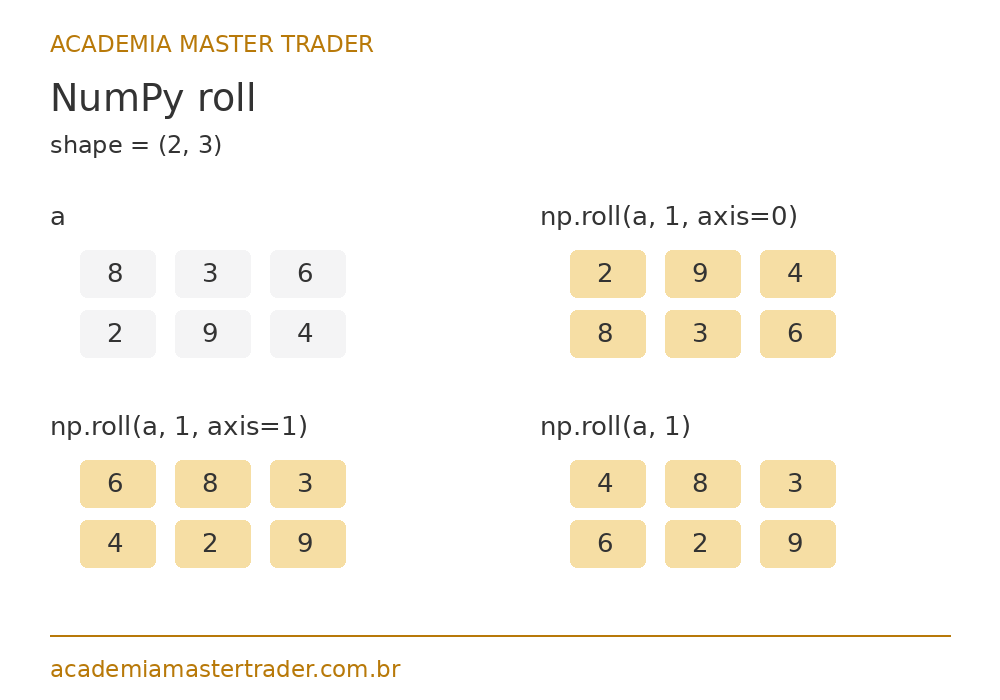
After import numpy as np, define a = np.array([[8,3,6],[2,9,4]]). Its shape is (2,3), with two rows and three columns. The first row is eight, three and six. The second is two, nine and four. There are six elements. We will use a positive shift of one and compare calls that differ only in their axis argument.
The NumPy documentation states that elements moving beyond the last position return at the first position. Roll therefore does not fill the boundary with zeros or empty entries. The elements remain present, but their positions change. The output has the same shape as the input. In this lesson, every result still has two rows and three columns.
Shift the columns within each row
The call np.roll(a,1,axis=1) gives [[6,8,3],[4,2,9]]. Along axis one, each value moves one column position forward. Six leaves the last column of the first row and reappears in its first column. Eight moves to the middle and three moves to the last column. The second row follows the same rule independently.
Follow four as another example. It starts at position (1,2) and moves to (1,0). Its row coordinate stays one, because the shift is along the column axis. The wrapping happens within that row. Four does not move into the first row in this call. Naming the axis is what defines the boundary across which each value returns.
Shift the rows as complete units
The call np.roll(a,1,axis=0) gives [[2,9,4],[8,3,6]]. The second row moves past the final row position and returns as the first row. The original first row moves to the second position. Values keep their order within each row. Eight is still followed by three and six, while two is still followed by nine and four.
There are only two row positions in this input. Shifting by one along axis zero therefore exchanges the rows. This result happens to match reversing the row order for this particular two row matrix. That agreement does not make circular shifting and reversal the same operation in general. With more positions, their movement rules need not give the same arrangement.
Understand the call without an axis
The call np.roll(a,1) gives [[4,8,3],[6,2,9]]. Without an axis argument, NumPy first flattens the input, shifts the resulting sequence and then restores the original shape. Here the flattened order starts as [8,3,6,2,9,4]. Shifting it by one produces [4,8,3,6,2,9], which is arranged back into two rows of three positions.
This explains why four reaches the first row in this result but stays in the second row for axis one. The two calls use different sequences for the circular movement. The figure shows both results alongside the axis zero result, all starting from the same input. Do not read the panels as successive steps. Each panel answers a separate question about the chosen axis.
Keep positions separate from new observations
Roll changes where existing values appear. It does not generate a new measured value for an empty boundary, and it does not represent a prediction of what comes next. In a time labelled dataset, the returning boundary value is an existing element from elsewhere in the sequence. A circular shift should therefore be described as circular, rather than silently presented as a newly observed period.
The shift amount and the axis are different parameters. The amount says how many positions to move; the axis says which ordered positions to follow. Leaving out the axis selects the flattened behaviour described above, not an automatic shift inside every row. Record both parameters when explaining an output so that another reader can reproduce the intended arrangement.
Continue learning with Academia Master Trader at academiamastertrader.com.br and in Aprenda. Write the input shape, choose the axis and follow the element at the boundary first. Then place the remaining values and confirm the restored shape. This makes circular movement visible and keeps it distinct from adding information or changing the values themselves.