NumPy rot90 turns a matrix through a chosen plane rather than sorting its values
A quarter-turn changes where values appear in a matrix. NumPy rot90 expresses that operation with a number of turns and an ordered pair of axes. For a two-dimensional array, the default call makes one counterclockwise quarter-turn. It changes the arrangement of the entries without comparing their sizes or calculating new numerical values.
Academia Master Trader presents this lesson for English-language study in Belize. The matrix uses invented teaching values, not prices or financial results. A rectangular example makes the change of shape visible. The aim is to connect a drawing with the function parameters so that the direction of the rotation can be explained precisely.
Start from a rectangular input
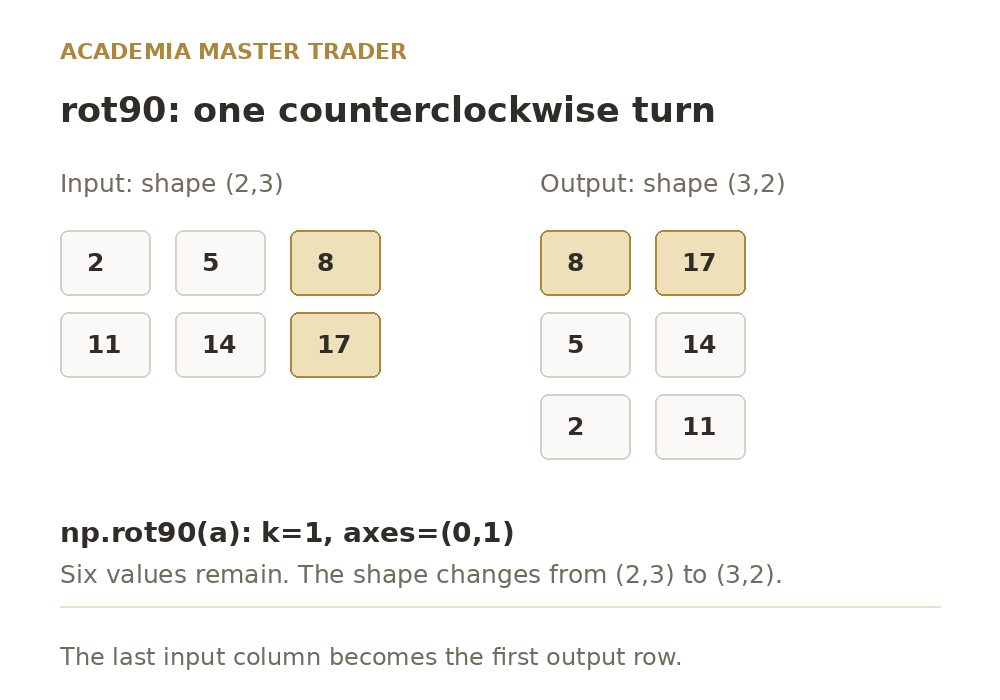
Let a have rows [2,5,8] and [11,14,17]. There are two rows and three columns, giving shape (2,3). Axis 0 identifies the rows and axis 1 identifies the columns. The first entry a[0,0] is 2, and the final entry a[1,2] is 17.
The default expression np.rot90(a) uses k=1 and axes=(0,1). The documentation describes the direction as from the first selected axis towards the second. For this usual two-dimensional drawing, that is counterclockwise. Naming both defaults keeps the meaning clear when later examples use a different axis order.
Read the first quarter-turn
The output of the default call has rows [8,17], [5,14] and [2,11]. Its shape is (3,2). The original final column becomes the first output row, the original middle column becomes the middle row and the original first column becomes the final row.
There are still six values. A quarter-turn of this rectangle exchanges the two side lengths, so the shape changes without changing the number of entries. This is different from an operation that creates an additional axis or removes a dimension. The output is still a two-dimensional matrix.
Follow a coordinate rather than a colour
In the input, the value 8 is at position [0,2]. After the default rotation, it appears at output position [0,0]. The value 11 begins at [1,0] and appears at output position [2,1]. These two mappings help establish the direction without relying on an arrow in a drawing.
For an input with two rows and three columns, output position [i,j] comes from input position [j,2-i] under this default quarter-turn. The expression describes the arrangement used here. It is not a comparison of the values, and changing a value would not change the coordinate mapping.
Let k count quarter-turns
The parameter k is the number of rotations by 90 degrees. With np.rot90(a,k=2), the result has rows [17,14,11] and [8,5,2]. That is a half-turn. Its shape is (2,3), because two quarter-turns bring the side lengths back to their original order.
With k=3, the rows are [11,2], [14,5] and [17,8], with shape (3,2). Four quarter-turns return the original arrangement of values. Tracking the output rows beside each k is more reliable than describing every call as a vague turn of the table.
Distinguish a negative turn from reversed axes
For the default axes, k=-1 gives one clockwise quarter-turn. In this example, the rows are [11,2], [14,5] and [17,8]. That is the same arrangement as three counterclockwise quarter-turns, although the parameter describes the direction in a different way.
The official documentation also explains that k=1 with axes=(1,0) reverses the direction of k=1 with axes=(0,1). It is equivalent to k=-1 with axes=(0,1). The order of the two axes therefore matters. The axes must be different; they are an ordered pair defining a plane, not an unordered set of labels.
Keep rotation separate from transposition
A transpose of the input would give rows [2,11], [5,14] and [8,17]. A default quarter-turn instead gives [8,17], [5,14] and [2,11]. Both have shape (3,2), but their values occupy different positions. Shape alone is not enough to identify which transformation was applied.
A written explanation should include the function name, k and axes, then show at least one coordinate mapping. That combination distinguishes a rotation from a transpose or a reversal. It also avoids suggesting that the function sorts rows into increasing or decreasing order.
Recognise the rotated view
The documentation describes the output as a rotated view. With a NumPy array input, this is different from making an independent copy of every entry. If b=np.rot90(a), editing through b can affect the corresponding input data. Follow the coordinate mapping when explaining which input entry an edit reaches.
For an ordinary writable NumPy array in this example, b[0,0] corresponds to a[0,2]. If you need a separate editable result, b=np.rot90(a).copy() explicitly makes a copy after the rotation. The choice between a view and a copy concerns how the data is shared, not which way the matrix appears to turn.
Name the plane in a larger array
The documented input requires two or more dimensions. For a three-dimensional input, the axes parameter selects which two axes define the rotation plane. A call using axes=(1,2) works in a different plane from a call using axes=(0,1). The unselected axis is not the axis pair being rotated.
Before interpreting such a result, write the complete input shape and identify the two selected axes. For odd quarter-turns, their lengths exchange places. Keep that structural description separate from the meaning attached to each dimension in your own dataset.
Continue learning with Academia Master Trader at academiamastertrader.com.br. Aprenda opens the educational material. Keep the input beside the rotated view, state k and the ordered axes, and use the coordinates to explain where each value appears.