NumPy select applies ordered conditions and uses the first matching choice at each position
Several conditions can describe alternative ways to fill an output array. NumPy select pairs each condition with a choice and gives priority to the first matching condition at each position. Academia Master Trader explains this rule in English for readers in Kazakhstan. Constructed examples show how overlaps, defaults and list order determine the result. Writing the rules down makes the selection easier to follow than looking only at the final values.
Pair conditions with their choices
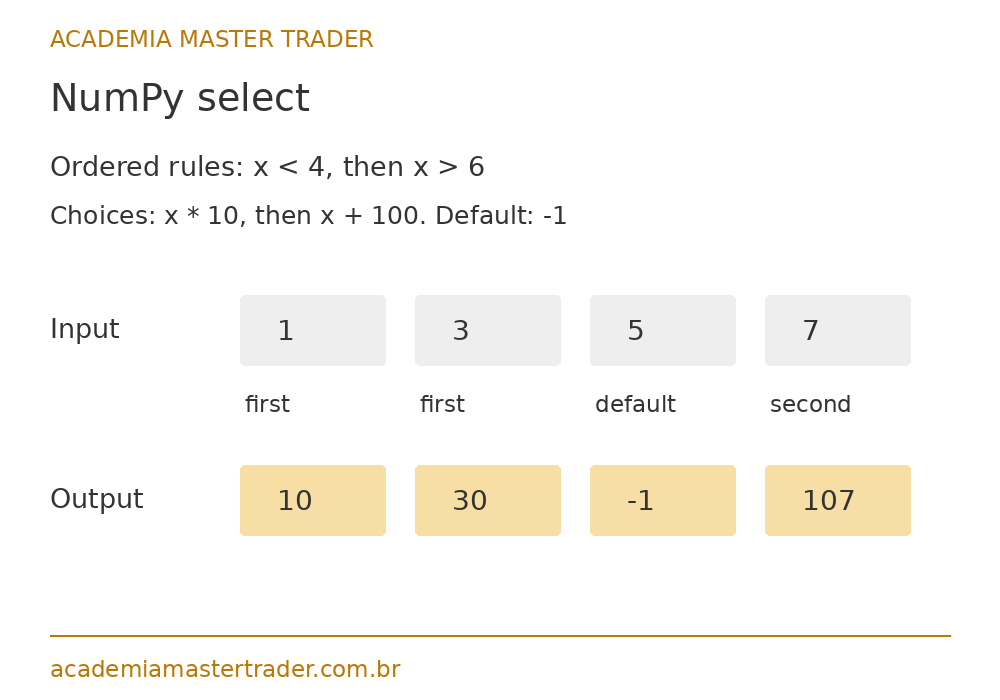
After import numpy as np, define x = np.array([1,3,5,7]). Set conditions = [x < 4,x > 6] and choices = [x * 10,x + 100]. The call np.select(conditions,choices,default=-1) returns [10,30,-1,107]. The first condition selects ten times x, and the second selects x plus one hundred.
At values one and three, the first condition is true, so their outputs are ten and thirty. At five, neither condition is true, so the output is the default minus one. At seven, the second condition is true, producing one hundred and seven. The condition list and choice list must contain the same number of entries.
The first true condition has priority
Now set conditions = [x < 6,x > 2], while retaining the same choices. The call np.select(conditions,choices,default=-1) returns [10,30,50,107]. At three and five, both conditions are true. The first condition supplies the output, so those positions use ten times x rather than x plus one hundred.
The function does not combine the matching choices or select the largest numerical result. It uses list order as the priority rule. This matters when two conditions overlap even if the example appears to describe separate categories. Inspect their Boolean arrays directly instead of assuming that every position can satisfy only one condition.
Reordering changes the priority rule
If the condition and choice pairs are reversed together, the overlap is handled differently. The expression np.select([x > 2,x < 6],[x + 100,x * 10],default=-1) returns [10,103,105,107]. At three and five, the condition naming x plus one hundred is now encountered first.
Keep each condition beside its matching choice when changing order. Reordering only one list changes the pairing as well as the priority and can express a different rule from the one intended. A short written mapping, such as less than six means ten times x, helps preserve the relationship between each condition and its output.
A default covers positions with no match
The default argument supplies an output wherever every condition is false. If it is omitted, the documented default is zero. For the initial conditions, np.select([x < 4,x > 6],[x * 10,x + 100]) returns [10,30,0,107]. The zero at the position containing five comes from that default.
An output value alone does not reveal whether it came from a choice or the default, particularly when a choice can produce the same value. Retain the conditions and rule description when that distinction matters. A default is part of the selection design, not evidence that the corresponding source value was zero or missing.
Read each output through the ordered rules
Select fills the output position by position using the supplied condition and choice pairs. In these examples, x retains its original values. The transformed numbers belong to the constructed output; they do not replace the source merely because the rule mentions x.
Continue learning with Academia Master Trader at academiamastertrader.com.br and in Aprenda. Check the pairings, inspect overlaps and state the default explicitly. Then trace each result back to the first true condition. This keeps a multi condition selection understandable without assigning hidden meaning to its priority order.