NumPy squeeze removes length one axes without turning every result into a scalar
An array can contain an axis of length one without containing only one value overall. NumPy squeeze removes axes whose lengths are one. It can remove all such axes or only a selected subset. Reading the shape first is the clearest way to understand which positions can be removed and what the remaining shape will describe.
Academia Master Trader presents this guide in English for readers in Sri Lanka. The arrays are small teaching examples for following dimensions. They are not market prices or financial results. The aim is to separate three ideas: the number of values, the number of dimensions and the length of each axis. Those quantities play different roles in the operation.
Start with the documented shape
The official reference creates x=np.array([[[0],[1],[2]]]). Its shape is (1,3,1).
There are three axes. Axis zero has length one, axis one has length three, and axis two has length one.
The input contains three values, even though two entries of its shape are one. A length one axis describes a part of the array structure. It does not say that the entire array has just one element.
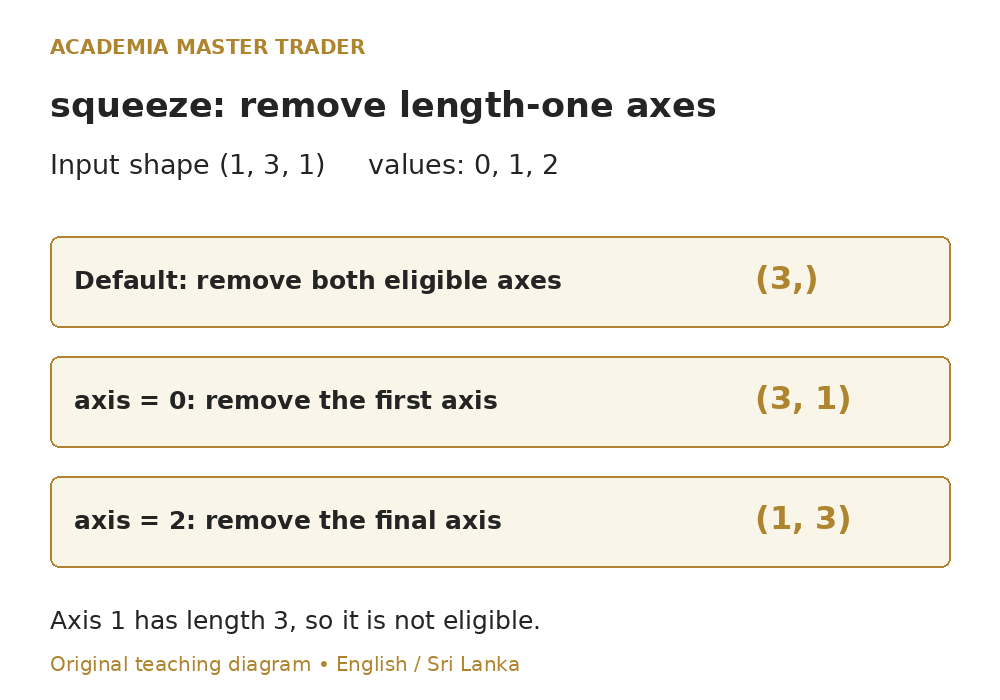
The default removes both length one axes
For this input, np.squeeze(x).shape is (3,) in the reference.
Axis zero and axis two both qualify for removal, so the remaining result has one dimension with length three. The values zero, one and two remain represented by that length three axis.
The default axis parameter is None. In this case, it removes all length one axes rather than choosing just the first one. Stating this rule matters because several such axes can occur in one shape.
Selecting axis zero keeps the final axis
The call np.squeeze(x,axis=0).shape gives (3,1).
Only the selected leading axis is removed. The trailing length one axis remains because this call chose a subset of the eligible axes.
The result therefore still has two dimensions. A reader looking only at the values might overlook this difference, so write the output shape beside the call. Removing one eligible axis and removing every eligible axis are distinct instructions.
Selecting axis two keeps the first axis
The call np.squeeze(x,axis=2).shape gives (1,3).
Now the trailing length one axis is removed and the leading length one axis remains. Compare this with (3,1) from the previous call.
Both outputs describe three values and both have two dimensions. Their shape entries have different positions, however. They cannot be treated as interchangeable shapes merely because their element counts agree.
Axis one cannot be removed in this input
The reference shows that np.squeeze(x,axis=1) raises a ValueError. Axis one has length three, not length one.
This is a condition on the selected axis, rather than a request to reduce that axis to length one. Squeeze does not choose a value from the length three axis to make the instruction fit.
Before specifying an axis, locate its entry in the input shape. The axis number and the axis length are not the same quantity. Here, axis one happens to have length three; the number one in its name does not make it eligible for removal.
A tuple can select a subset
The axis parameter accepts an integer or a tuple of integers, as well as the default None.
The reference describes this selection as a subset of entries of length one in the shape. Every selected axis must satisfy that length condition.
Keep the exact selection with the input shape when explaining a call. A tuple of axis positions is not a tuple of new lengths. It tells the operation which eligible positions to remove, rather than describing a replacement shape directly.
Removing every axis still returns an array
The documentation also uses x=np.array([[1234]]), whose shape is (1,1).
After np.squeeze(x), the displayed result is array(1234) and its shape is (). The reference explicitly identifies this as a zero dimensional array, not a scalar.
It also shows np.squeeze(x)[()] yielding 1234. Keep that extra indexing step distinct from the squeeze operation itself. A single displayed value does not by itself establish that the result of a function is a scalar.
The return relationship matters too
The documented result is always the input itself or a view into it. Do not describe a smaller shape as a promise of a new independent copy.
Continue learning with Academia Master Trader at academiamastertrader.com.br. Aprenda gives access to educational resources. Read the full input shape, identify the length one entries and keep the selected axes visible in your notes. Squeeze removes eligible axes, while the remaining lengths explain the output structure.