NumPy tril preserves a lower triangular region rather than the smallest numbers
When a matrix is arranged in rows and columns, its diagonals describe positions. NumPy tril uses one of those diagonals as a boundary. It returns a copy in which entries above the selected diagonal become zero. Entries on that diagonal and below it keep their values. The word lower refers to their location in the matrix, not to how large or small those values are.
Academia Master Trader presents this lesson for English-language study in Trinidad and Tobago. The matrix contains invented teaching values. It does not represent an asset, a price series or a financial result. A small example lets you follow the coordinates directly and understand the transformation before applying it to a larger array.
Establish the input before reading the output
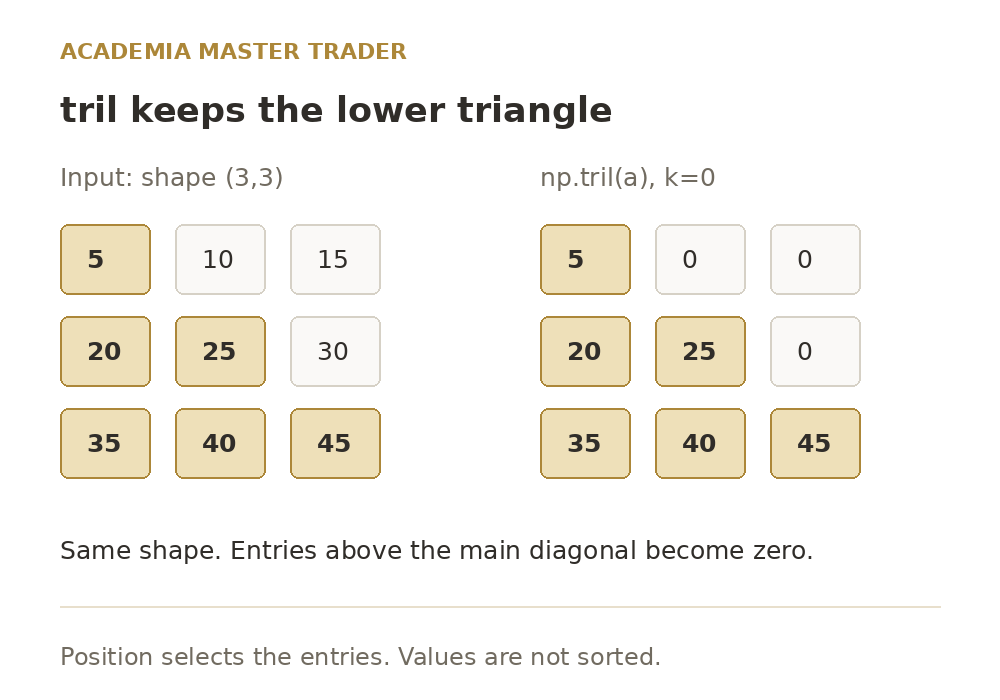
Let a have rows [5,10,15], [20,25,30] and [35,40,45]. There are three rows and three columns, so its shape is (3,3). NumPy coordinates start at zero. The entry a[0,0] is 5, a[1,1] is 25 and a[2,2] is 45. These positions form the main diagonal.
The values below that diagonal are 20,35 and 40. The values above it are 10,15 and 30. This positional description already tells you which region a default call to tril will retain. There is no need to compare one value with another to decide where the boundary falls.
Follow the default boundary through the rows
The expression np.tril(a) uses the default k=0. Its result has rows [5,0,0], [20,25,0] and [35,40,45]. In the first row, only the main diagonal entry remains. In the second row, the first two entries remain. In the third row, every entry is on or below the main diagonal and therefore remains.
The output still has shape (3,3). It has not become a list containing only six numbers. Instead, it is a matrix with nine positions, three of which have been set to zero. Keeping shape and content separate makes the result easier to describe, particularly when another calculation expects a two-dimensional input.
Distinguish a boundary from a ranking
The value 35 remains because it occupies row 2, column 0, below the main diagonal. The smaller value 10 becomes zero because its position is row 0, column 1, above that diagonal. The function is not choosing the smallest values. It would use exactly the same positional boundary if those two values were changed.
For the default boundary, the preserved positions satisfy column j less than or equal to row i. With a general k, the rule becomes j minus i less than or equal to k. You can apply that rule to one coordinate at a time. It explains the lower triangular pattern without relying on the colour or arrangement of a particular drawing.
Move the boundary with a positive k
A positive k selects a diagonal above the main diagonal. For np.tril(a,k=1), the output rows are [5,10,0], [20,25,30] and [35,40,45]. The first diagonal above the main diagonal is now included. Only the position containing 15 sits above the selected boundary and becomes zero.
This is why a positive k can preserve more entries than the default call. It does not mean that the result shifts the original values into new cells. Every preserved value stays at its original coordinate. The change is in which coordinates qualify to remain, while all other coordinates in the output are filled with zero.
Move the boundary with a negative k
A negative k selects a diagonal below the main diagonal. For np.tril(a,k=-1), the output rows are [0,0,0], [20,0,0] and [35,40,0]. The main diagonal is above this new boundary and becomes zero along with the entries already above it. The preserved region is therefore smaller than it was with k=0.
Writing all three outputs beside their k values makes the difference clear. Zero includes the main diagonal. One includes a diagonal above it. Minus one excludes the main diagonal and begins with the diagonal below it. The sign describes the selected diagonal, not a command to add or subtract values from the matrix.
Retain the original when interpreting zeros
The official NumPy documentation describes the result as a copy with the same shape and data type as the input. Naming the output b=np.tril(a) keeps its role distinct from the input a. The call does not mean that a has been replaced by its lower triangular form.
A zero in the output is not always evidence that the function changed that cell. Some input cells may already contain zero. If the difference matters, compare the original matrix with the output using their coordinates and the selected k. The triangular copy carries the resulting values, not an explanation of the origin of each zero.
Identify the relevant axes in a larger array
The documented input shape allows different row and column counts. A square drawing is helpful for a first explanation, but tril also applies to rectangular matrices. The result keeps the input shape. A position is still judged against the diagonal boundary even when one dimension extends beyond the other.
For inputs with more than two dimensions, tril applies to the final two axes. Those axes define the matrix positions within each slice. Earlier axes distinguish the slices. Before interpreting such an output, write down its full shape and identify which two dimensions supply the rows and columns for the triangular operation.
Keep the explanation tied to the coordinates
A complete explanation of this example names the input, k=0 and the output rows. It says that entries above the main diagonal become zero while the main diagonal and lower region retain their values. It does not describe a sort, a sum or a selection based on magnitude.
Continue learning with Academia Master Trader at academiamastertrader.com.br. Aprenda opens the educational material. Work through one row at a time, retain the input alongside the output and use the diagonal boundary to explain every preserved entry.