NumPy where chooses between two sources at each position using an explicit condition
Choosing a value by a condition is different from removing every position that fails it. With three arguments, NumPy where builds an output by selecting from one source where the condition is true and another where it is false. Academia Master Trader explains that operation in English for readers in Switzerland. The small arrays below are constructed numerical examples. Their conditions describe a processing rule, not a forecast or evidence of investment performance.
State the condition and both choices
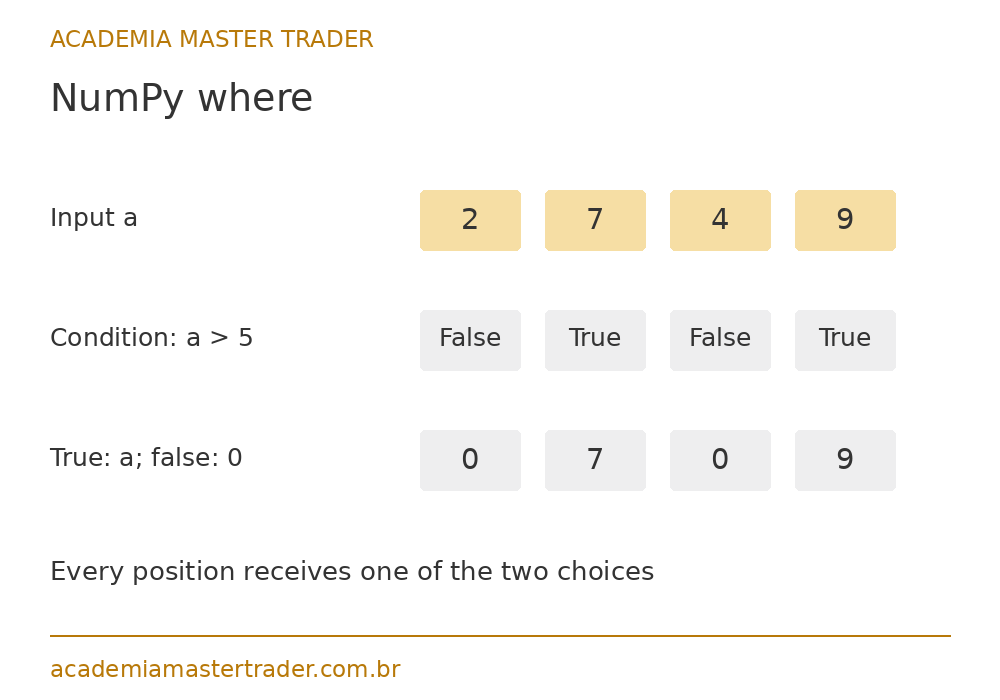
After import numpy as np, define a = np.array([2,7,4,9]). The comparison a > 5 gives [False,True,False,True]. The call np.where(a > 5,a,0) returns [0,7,0,9]. At positions where the comparison is true, the output takes the corresponding entry from a. Where it is false, the output takes zero.
The argument order is condition, choice for true, choice for false. Reversing the last two arguments changes the rule. For example, np.where(a > 5,0,a) returns [2,0,4,0]. The comparison did not change, but the sources attached to its two possible outcomes did.
Read one position at a time
The figure shows the original entries, the comparison results and the selected output. Begin with two: it is not greater than five, so the result is the false choice zero. Seven is greater than five, so the next output is seven. Applying the same rule to four and nine gives zero and nine.
All four positions remain in this example. The zeros are chosen replacement values, not original measurements of zero. Keeping the original a available makes it possible to explain what those positions contained before selection. The output alone does not preserve that information when several original values share the same false choice.
Compare selection with filtering
The expression a[a > 5] returns [7,9], which contains only the entries whose comparison is true. That is a filtered result with two entries. By contrast, np.where(a > 5,a,0) returns four entries because every original position receives one of the two choices.
Choose between these operations from the structure you need. A position preserving result can remain aligned with another four entry array. A filtered result has a different length. Neither result is automatically more informative; they answer different questions, and their labels should identify which operation was used.
Use two arrays as the value sources
Define b = np.array([20,70,40,90]). The call np.where(a > 5,a,b) returns [20,7,40,9]. The false positions now take twenty and forty from b instead of a shared zero. The true positions still take seven and nine from a. Selection compares no values from b with five in this expression: the condition was defined entirely from a.
This separation lets a condition come from one calculation while the chosen values come from other arrays. Explain that relationship explicitly. A reader should be able to identify the condition, the true source and the false source without inferring them from the final numbers.
Check shapes and distinguish the one argument form
The condition and both sources must be broadcastable to a common shape. The scalar zero in the first example supplies the same false choice at every position. For a matrix example, np.where([[True,False],[False,True]],[[2,3],[4,5]],0) returns [[2,0],[0,5]], preserving the common two by two structure.
Calling where with only a condition has a different role: it returns index arrays through the nonzero operation rather than choosing between two value sources. NumPy recommends using nonzero directly for that purpose. Keep that form separate from the three argument examples explained here.
Continue learning with Academia Master Trader at academiamastertrader.com.br and in Aprenda. Record the condition, both sources and their common shape. Then follow one true and one false position manually. Those checks keep value selection distinct from filtering and from a claim that the selected values predict anything.