FOSS ASIA 2021


FOSS ASIA 2021
Conference : FOSSASIA Summit 2021 Location :ONLINE Date : March 13 – 21
REFERENCES
TAGS

This work is licensed under a Creative Commons Attribution-ShareAlike 4.0 International License
Paul Sutton – personal blog
FOSS ASIA 2021
FOSS ASIA 2021
Conference : FOSSASIA Summit 2021 Location :ONLINE Date : March 13 – 21
REFERENCES
TAGS
This work is licensed under a Creative Commons Attribution-ShareAlike 4.0 International License
Messenger Apps
The recent announcement that WhatsApp will be sharing more information with Facebook has resulted in people migrating to Telegram and Signal.
However there are many more alternatives, that are based on Free and Open source software
REFERENCES
TAGS
#YearOfTheFediverse,#Conversations, #Gajim, #Matrix,#Wire,#Deltachat,#Chat,#Apps,#Messenger, #Communication,#Jami,#Signal,#Telegram,#DeltaChat,#Element
This work is licensed under a Creative Commons Attribution-ShareAlike 4.0 International License
Small web episode 5
Join Aral and Laura, for episode 5 of their weekly webcast.
REFERENCES
I have put a schedule for the next two months here to help with promotion.
TAGS
#YearOfTheFediverse,#small-tech
This work is licensed under a Creative Commons Attribution-ShareAlike 4.0 International License
DeVeDeNG
DeVeDeNG
I have been looking for a program to help create DVDs from movie files. I have found a program via the Debian users mailing list called DeVeDe which is really easy to use.
Installing devede and other related packages.
Firstly you need to install the software with
apt install devede
In general I use brassero to record the cd / dvd
apt install brassero
I have also used youtube-dl to download youtube videos for off line viewing.
apt install youtube-dl
What next.
Firstly you need to create a new directory within your system /home structure, then download a video. This can take some time depending on how long the video is that you’re downloading, the speed of your connection and other factors.
Once done you can use Devede to create your DVD.
Under Debian this can be found on the Sound and Video menu folder as DeVeDeNG
We want to create a DVD video so select the first option in this menu.

You are then presented with :

Now click add
From here navigate and select files to add to your dvd.
You will then be taken back to the main window.

We can now set up a menu, the create menu with the titles is ticked, by default so if you now click menu options:

We can fine tune our dvd menu.
If you are adding more than 1 video you may want to check the play all option. You also need a menu title. The other options are about customizing the look and feel of your dvd. Once you are happy with this. press OK to go back to the main screen and press forward.
You can now select where to save your ISO file. The default seems to be /home/user/movie, which is probably fine. Note that this folder should be EMPTY if not anything within this will be erased. I changed my folder to movie2 to be on the safe side.

Once the process is complete you will have an ISO file You also have an option to burn this to a DVD, in which case your default burner software will open. This part is beyond the scope of this post. I will do a separate post for that
Once you have an ISO you can open it in VLC player (for example) and test it works OK and you’re happy with everything you can navigate to where you saved your iso file, right click and in my case I would open in Brasero.
REFERENCES
TAGS
#YearOfTheFediverse,#DeVeDeNG,#DVD,#Creation
This work is licensed under a Creative Commons Attribution-ShareAlike 4.0 International License
Numbers, units and arithmetic
I have just completed the course 'Numbers, units and arithmetic' with Open Learn. This is an excellent 5 hour course and will be really useful going forward.
Well worth doing if you need a refresher as there are lots of worked examples and activities to have a go at to re-enforce learning.
You can of course, as with any OpenLearn course use this as a reference in the future if you need to revise or revisit how to do something. Full PDF of the course is also .
REFERENCES
TAGS
#OpenUniversity,#Maths,#Study,#Learning,#OpenLearn.
This work is licensed under a Creative Commons Attribution-ShareAlike 4.0 International License
Text to speech
Text to speech utilities are really useful, especially if you want make your text more accessible to those who can't read or access text based resources, this maybe due to a variety of reasons.
One solution to this is Festival text to speech, this can be installed with.
apt install festival festvox-rablpc8k
Which will use the 8K audio option.
So you can run this with festival —tts text.txt and the software will read out the contents of the file text.txt.
The —tts option stands for text to speech.
REFERENCES
TAGS
This work is licensed under a Creative Commons Attribution-ShareAlike 4.0 International License
PM Press
PM Press is an independent publisher that specializes in radical, Marxist and anarchist literature, as well as crime fiction, graphic novels, music CDs, and political documentaries. It has offices in the San Francisco Bay Area, Los Angeles, and West Virginia
Just giving them a mention here, to try and boost exposure and help give the small business the boost they need.
REFERENCES
TAGS
#YearOfTheFediverse,#PMPress,#ebooks,#libre,#books
This work is licensed under a Creative Commons Attribution-ShareAlike 4.0 International License
Open University Space Science Newsletter
As I have studied with the Open University [1]. I am now part of the Alumni Association. At the end of 2020 I joined the new OU Students Space Science Club. Soon after this there was a call for ideas for a Newsletter.
I decided to offer to help put something together, so have been undertaking this.
Issue one, has been completed and sent out. I am now working on issue 2.
I am writing this in $\LaTeX$ [2] using Overleaf[3], which is much easier for creating documents, then word processing systems.
The newsletter is a mix of news about space and space science, links to related websites.
REFERENCES
1 Open Unversity 2 LaTeX Project 3 Overleaf
TAGS
#OpenUniversity,#SpaceScience,#Group,#Newsletter
This work is licensed under a Creative Commons Attribution-ShareAlike 4.0 International License
SpaceX Launch
Less than 1 hour till the next Falcon 9 Launch. (15:00 UK time)
Thanks to Mastodon News Bot for posting
REFERENCES
TAGS
#YearOfTheFediverse,#Space,#Launch,#KSC,#Falcon9,#NASA
This work is licensed under a Creative Commons Attribution-ShareAlike 4.0 International License)
WICD Curses
wicd-curses
wicd-curses is a console program that allows you to connect to wireless wifi networks. I found out about this after chatting on IRC with a few other users on freenode and mentioned I was having issues connecting to wifi from the command line.
This can be installed using apt install wicd-curses. A man page can be viewed with man wicd-curses.
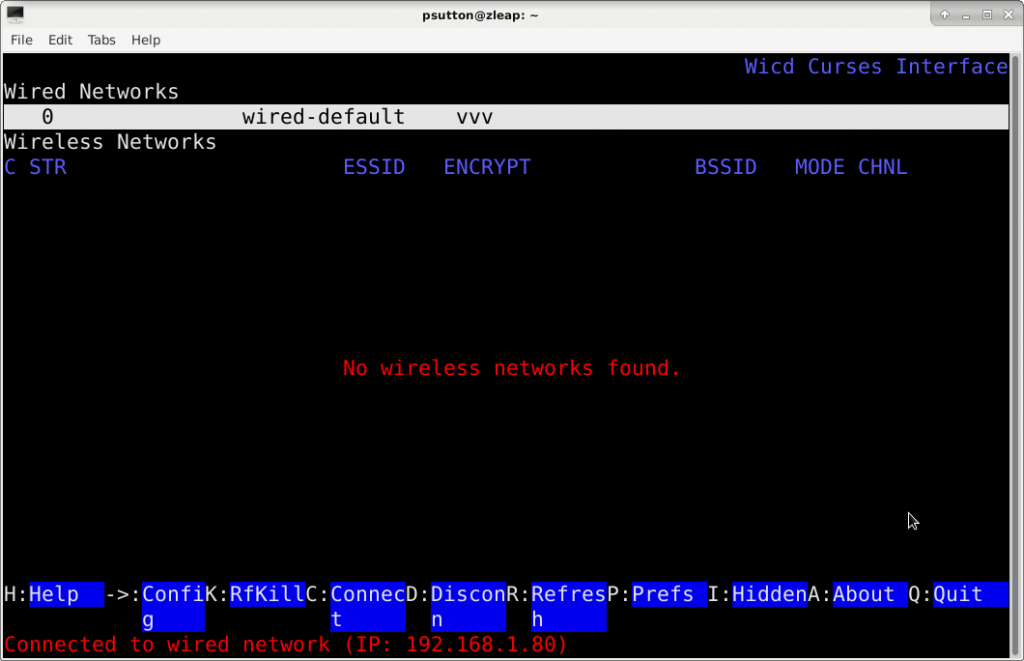
As I am using Debian then the package information can be found here.
The above screenshot is from my desktop which does not have or even need wifi connection. But on my netbook this should show available wifi networks, and allow the one you want to be selected. You will probably need your wifi credentials e.g password etc to connect further.
Another step to seeing if I can actually use a computer directly from the command line without the need for a gui. I need to try and configure alpine to now send e-mail and I may be nearly there. However this isn’t really essential to my needs anyway.
Please feel free to discuss further on Mastodon
#console,#wicd-curses,#network,#wireless,#YearOfTheFediverse,
This work is licensed under a Creative Commons Attribution-ShareAlike 4.0 International License