Paul Sutton

Paul Sutton – personal blog

PinePhone : Manjaro Lomiri OS

I found this on Mastodon, a review of the Manjaro Lomiri OS by LINux on MOBile

Video can be found here on lbry but can also be viewed on the Mastodon feed.

#mastodon,#video,#PinePhone,#Manjaro,#Lomiri,#OS,#phone, #hardware,#linux,#free,#software,#opensource,#open,#source

Active galaxies Review

So following on from the post on December 1st this is a quick review of the active galaxies lecture from the Space Telescope Science Institute.

This lecture, presented by Dr Mitchell Revalski, is really interesting, looking at how supermassive black holes, despite their small size compared to the galaxy they reside in.

Energy from these can push away surrounding gas, and heat this up which reduces star formation as gas needs to cool to form stars.

so scales are pretty huge:

First lets look at what a light year is

Citation : spaceplace.nasa.gov

For most space objects, we use light-years to describe their distance. A light-year is the distance light travels in one Earth year. One light-year is about 6 trillion miles (9 trillion km). That is a 6 with 12 zeros behind it! 

1 pc = 1 parsec = 3.26 light years

Supermassive black hole < 1pc

Bulge = 1 = 3 kpc (kilo parsec)

disk 30 kpc

circumgalactic area 50kpc

So even though these black holes are very small, they have a big influence on what surrounds them.

We know this is happening thanks to the research that led to the 2020 Nobel prize.

Well worth watching and the link is above.

Next lecture 19th Jan – The Darkest Secrets of the Universe Speaker: Raja Guhathakurta (UC Santa Cruz)

#astronomy,#science,#space,#telescope,#scsci,#talk, #solarsystem,#galaxy,#blackhole,#supermassive,#stars, #gravity,#light,#matter,#atoms,#emissions,#aabsorption, #spectrum,#gamma,#xray,#visible,#invisible,#parsec, #lightyear,#distance,#galactic,#bulge,#spacetelescope, #groundtelescope,#astronomers,#education,#public

Covid 19 course review

I recently undertook a free Covid19 awareness course with CPD Online College

This was a free course to help raise awareness of various issues around Covid 19. However it looks like the course is now costing around £5.

The course was split in to six units * Unit 1 – Introduction to COVID – 19 * Unit 2 – Identifying and Assessing Risks * Unit 3 – Symptoms of COVID-19 * Unit 4 – Preventing the spread of COVID-19 * Unit 5 – Working From Home and In The Workplace * Unit 6 – The New Normal

Each of which were very comprehensive and based on the latest data, I completed this course BEFORE the vaccine approval was announced.

There was a lot of information on the responsibility of employers and employees to keep people safe as well as looking at how our lives are changing, how working from home has become a new normal and the effects of mental health on the lack of social and other interaction.

The course also covered people with other health conditions such as Diabetes and Cancer for example.

The course description was also very comprehensive.

Allow a few hours to complete the course, you can save progress and come back later, completing the quizzes test your learning and understanding, and and a certificate can be downloaded, printed which is official evidence of learning.

The course reflects our current knowledge so I think it is constantly updated so it is fresh and up to date with current developments.

Worth looking in to undertaking, just have lots of spare pages in your notebook, as you can write a lot of notes.

Creative Commons Licence
This work is licensed under a Creative Commons Attribution-ShareAlike 4.0 International License

Emacs Conference review

logo

This years EmacsConference [1] took place on the weekend of 28th and 29th November. This is the online conference aimed at users of the stalwart text editor which is described as “An extensible, customizable, free/libre text editor” [2]

Emacsconf this year had users from all different backgrounds, who use Emacs for a range of applications from basic text editing, writing documents in LaTeX, HTML or Markdown. Emacs is also popular with programmers and developers working on their latest project(s), but can also handle reading / writing email, chat, debugging software, and also has a built in calender and organiser to help you keep track of what you are doing. All this from a single interface.

Emacs is free software, and released under the GNU license, so has the usual 4 freedoms of use, study, share and improve the software we use. Hence the more accurate name is GNU / Emacs.

Talks this year were presented with Big Blue button [5] and live streamed with gstreamer [4]. This combination worked really well. Talks were either longer talks with time for questions and answers or shorter lightning talks on quick subjects. Attendees could add their questions to a collaborative text pad, that everyone had access to. There was a big social presence using IRC (chat) [3] which was active during the conference.

Topics included development updates, a new users viewpoint, writing novels, Music and quite a few on Org Mode which is used for creating task lists and much more. Emacs, has a steep learning curve, but is very powerful and flexible to use. I am still learning the basics.

All the talks will be processed and presented online to catch up at a later date, all of last years talks are available online for free.

  1. https://emacsconf.org/
  2. https://www.gnu.org/software/emacs/
  3. https://webchat.freenode.net/ #emacsconf
  4. https://gstreamer.freedesktop.org/
  5. https://bigbluebutton.org/

This article has also been submitted to the Torbay Weekly.

Gallery part 3

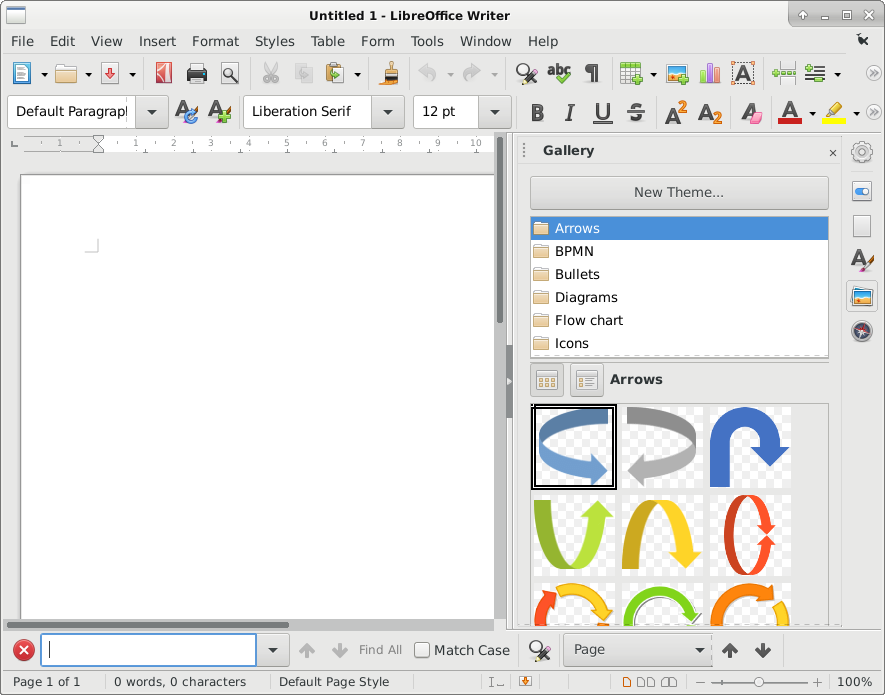
Inserting gallery images

  1. Image Gallery

Insert Menu —> Media —> Gallery

Image Gallery

Find the image you would like, drag to your page, you can then resize to suit, with the grab handles.

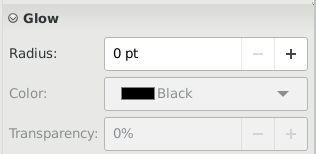
This allows you to set a glow effect around your image. This can make it stand out for example.

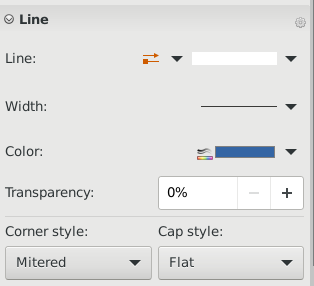
Here you can set various line properties.

Allows you to fine tune how big the image is, rotation and other properties

Sets other properties such as radius of the edge, to make it smoother for example.

For a deeper explanation of these tools please see the documentation. Or perhaps consider getting involved with the project so the team(s) can improve on this. There is a lot more work to do, and only a small team doing this.

Creative Commons Licence
This work is licensed under a Creative Commons Attribution-ShareAlike 4.0 International License

Gallery part 2

Manipulating your gallery image

  1. Image Gallery

Insert Menu —> Media —> Gallery

Image Gallery

The vertical option bar on the right displays:-

Option Bar

The options here are (top to bottom)

  • Sidebar Settings
  • Properties
  • Page
  • Styles
  • Gallery
  • Navigator

This section will concentrate on Properties

The first option Area will display

Properties Area

Video

Creative Commons Licence
This work is licensed under a Creative Commons Attribution-ShareAlike 4.0 International License

Gallery part 1

Inserting gallery images

  1. Image Gallery

Insert Menu —> Media —> Gallery

Image Gallery

Find the image you would like, drag to your page, you can then resize to suit, with the grab handles.

Video

Creative Commons Licence
This work is licensed under a Creative Commons Attribution-ShareAlike 4.0 International License

APG password generator

Debian comes with a useful command line utility called apg for generating passwords, based on criteria set when it is run.

You may need to install with apt install apg

Running just apg produces


ag"OnAub3 (ag-QUOTATION_MARK-On-Aub-THREE)
yissheav-Flas6 (yis-sheav-HYPHEN-Flas-SIX)
rek_OfDot6ly (rek-UNDERSCORE-Of-Dot-SIX-ly)
yorthIs0Ot; (yorth-Is-ZERO-Ot-SEMICOLON)
NapOl{aj6 (Nap-Ol-LEFT_BRACE-aj-SIX)
9Knyhik. (NINE-Kny-hik-PERIOD)

Where as using -m 16 produces a min length of 16 characters

apg -m 16


cryhejIryoatEpBi
DuVospewjopOtsye
veldIc@Ogguckeys
IalNexBeckOdjav1
drureroarAkucEdd
WinquivadLitsUk4

As a good password should be made up of Letters (upper and lower case) Numbers (0-9) Other characters ( !“£$()%^&* )

Then you need to run something like

apg -M sncl -m 16 -n 5

apg  -M sncl -m 16 -n 5 
EgUrr1slaibzydAr
IrgiOcyibgauvKan
jemUndafMinvieHo
Fliadweuldyeebup
enyaighKuedoobr3

The program man page also gives more info and an example shell script to help with the process.

man apg

shell script

[begin]----> pwgen.sh
       #!/bin/sh
       /usr/local/bin/apg -m 8 -x 12 -s
       [ end ]----> pwgen.sh

#linux,#debian,#shell,#password,#generation,#security,#help,#scripts,#secure,#unix,#gpl,#fsf,#freesoftware,#manpage, #manual,#web,#internet,#links,#letters,#numbers, #alphanumeric,#specialcharacters

Creative Commons Licence
This work is licensed under a Creative Commons Attribution-ShareAlike 4.0 International License

Small Tech Episode 1

Episode 1

Small is Beautiful – “It’s elementary, dear Watson!”

Discussion on elementary OS

#small,#tech,#episode1,#10thDec2020